 100% kostenloser Keylogger mit unbegrenzter Tastenanschlagaufzeichnung
Refog Free Keylogger ist eine wirklich kostenlose Windows-Anwendung, die jeden auf dem Computer getippten Tastenanschlag aufzeichnet. Die Funktion zur Tastenanschlagaufzeichnung funktioniert unbegrenzt, ohne Zeitlimits, ohne Testversionen und ohne die Notwendigkeit, für die grundlegende Tastenanschlagaufzeichnung zu bezahlen oder ein Upgrade durchzuführen.
KOSTENLOSEN KEYLOGGER HERUNTERLADEN Sofortiger Download | Keine Kreditkarte erforderlich
Geben Sie sich nicht mit begrenzten "kostenlosen Testversionen" zufrieden
Die meisten sogenannten kostenlosen Keylogger sind in Wirklichkeit Testversionen, die nach einigen Tagen nicht mehr funktionieren oder nur noch eingeschränkt nutzbar sind. Refog Free Keylogger ist anders – die Kernfunktion zur Tastenanschlagaufzeichnung funktioniert für immer ohne Einschränkungen oder Zahlungen.
So funktioniert's: Überwachung in 3 einfachen Schritten
- Herunterladen & Installieren – Die Installation dauert nur wenige Minuten. Installieren Sie es nur auf einem Computer, der Ihnen gehört, und teilen Sie Ihrem Kind oder dem offengelegten Mitarbeiter mit, dass die Überwachung aktiv ist.
- Im Hintergrund ausführen – Das Programm arbeitet unauffällig im Hintergrund, ohne zu stören, und der Zugriff auf die Protokolle ist durch das bei der Einrichtung festgelegte Passwort geschützt. Sichtbare, offengelegte Überwachung ist der empfohlene Standard; ein optionaler diskreter Modus ist für jüngere Kinder auf einem Haushaltsgerät verfügbar, bei dem Sie bereits erklärt haben, dass der Familiencomputer überwacht wird.
- Protokolle anzeigen – Greifen Sie jederzeit direkt auf dem Computer auf alle aufgezeichneten Tastenanschläge zu und überprüfen Sie sie.
Was Sie mit Refog Free Keylogger überwachen können
Unbegrenzte Tastenanschlagaufzeichnung
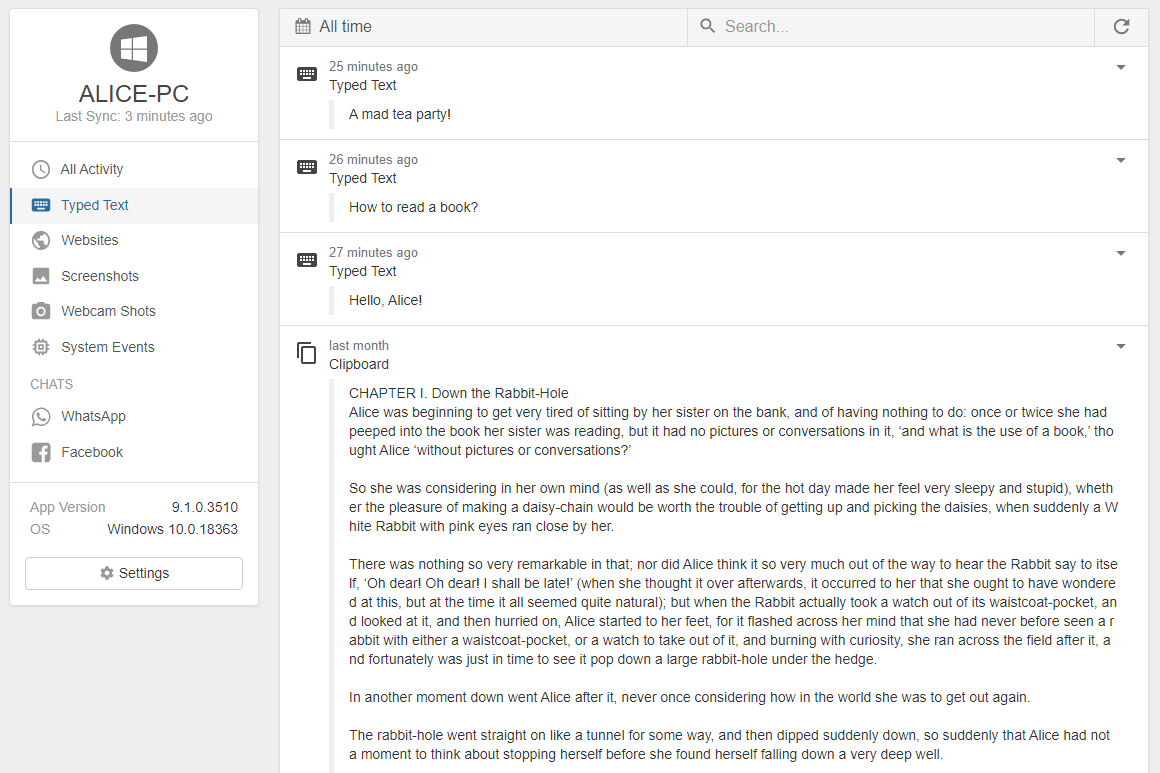
Erfasst jeden einzelnen Tastendruck in jeder Anwendung – Webbrowser, Messenger, E-Mail, Dokumente, Spiele und mehr. Jeder Eintrag ist mit einem Zeitstempel versehen und zeigt, welches Programm zu diesem Zeitpunkt aktiv war.
Vertraut von Eltern und Einzelpersonen
"Ich habe nach einer einfachen Möglichkeit gesucht, um zu wissen, was meine Kinder online tun. Refog Free Keylogger war die perfekte Lösung. Es ist einfach, es funktioniert und es ist tatsächlich kostenlos."
— Mark D., Vater
"Das kostenlose Tool von Refog tut genau das, was es verspricht: Es protokolliert jede Taste ohne Aufwand oder Kosten. Es gibt mir große Sicherheit."
— Jennifer L.
Ist Refog Free Keylogger wirklich kostenlos? 

Ja – und nicht im Sinne einer "kostenlosen Testversion". Die Kernfunktion der Tastenanschlagaufzeichnung hat kein Zeitlimit, keine Funktionsbeschränkung und erfordert keine Kreditkarte. Die meisten Tools, die sich als kostenlos bezeichnen, deaktivieren wichtige Funktionen oder funktionieren nach 3–7 Tagen nicht mehr, um Sie zu einem kostenpflichtigen Plan zu drängen. Die kostenlose Version von Refog funktioniert seit über zwei Jahrzehnten auf die gleiche Weise: Herunterladen, installieren und sie zeichnet Tastenanschläge unbegrenzt auf, ohne Sie jemals zu einem Upgrade aufzufordern.
Was zeichnet es auf?
Jeden Tastenanschlag, der in einer beliebigen Anwendung auf dem PC getippt wird – Browser wie Chrome, Edge und Firefox, Messaging-Apps, E-Mail-Clients, Dokumenteneditoren, Spiele und alles andere. Jeder Eintrag im Protokoll ist mit einem Zeitstempel versehen und mit der Anwendung gekennzeichnet, in der die Eingabe erfolgte, was Ihnen ein klares, chronologisches Protokoll aller getippten Aktivitäten liefert.
Wird die Person, die den Computer benutzt, wissen, dass es installiert ist?
Standardmäßig läuft Refog als sichtbare, benannte Anwendung mit einem dauerhaften Bildschirmsymbol, solange die Überwachung aktiv ist, sodass die Personen, die einen Computer benutzen, der Ihnen gehört, sehen können, dass es installiert ist. Für jüngere Kinder steht ein optionaler diskreter Modus auf einem Gerät zur Verfügung, das Ihnen gehört, nachdem Sie die Überwachung innerhalb Ihres Haushalts offengelegt haben. Der Zugriff auf die Einstellungen ist durch ein bei der Installation konfiguriertes Passwort geschützt.
Welche Windows-Versionen werden unterstützt?
Refog Free Keylogger ist vollständig kompatibel mit Windows 10 und Windows 11, einschließlich aller wichtigen Funktionsupdates für beide. Es läuft auf 32-Bit- und 64-Bit-Systemen, ohne dass zusätzliche Treiber oder Software erforderlich sind. Das Installationsprogramm ist leichtgewichtig und hat einen minimalen System-Fußabdruck, so dass es die Leistung des überwachten PCs nicht beeinträchtigt.
Wie installiere ich es?
Laden Sie das Installationsprogramm von der offiziellen Refog-Website herunter und führen Sie es auf dem Computer aus, der Ihnen gehört und den Sie überwachen möchten – Ihrem Familien-PC oder einem Firmengerät. Der Einrichtungsassistent führt Sie in wenigen Minuten durch den Prozess – Sie wählen den sichtbaren oder den diskreten Modus und legen ein Passwort fest, um den Zugriff auf die Protokolle zu schützen. Es sind keine technischen Vorkenntnisse erforderlich. Der gesamte Prozess ist so konzipiert, dass er für jeden PC-Benutzer einfach ist.
Was fügt die kostenpflichtige Version hinzu?
Die kostenlose Version ist der unbegrenzten Tastenanschlagaufzeichnung gewidmet und funktioniert unbegrenzt ohne Einschränkungen oder Zahlungen. Kostenpflichtige Pläne erweitern die Überwachung erheblich, indem sie den Verlauf der besuchten Websites, die regelmäßige Erfassung von Screenshots, die Aktivitätsverfolgung in Messaging-Apps wie WhatsApp, Telegram und Facebook Messenger sowie die Fernübermittlung von Protokollen per E-Mail hinzufügen. Wenn es Ihr Hauptziel ist, zu wissen, was auf dem PC getippt wird, ist die kostenlose Version völlig ausreichend. Das kostenpflichtige Upgrade ist für diejenigen gedacht, die einen umfassenderen Überblick über die Computeraktivitäten wünschen.
Ist es legal, einen Keylogger zu verwenden?
Das hängt vom Kontext und der Gerichtsbarkeit ab. Die Installation von Überwachungssoftware auf einem Computer, den Sie besitzen – wie z. B. einem Familien-PC, um die Aktivitäten eines Kindes zu überwachen, oder einem Firmengerät mit der informierten Zustimmung der Mitarbeiter – ist in den meisten Ländern im Allgemeinen rechtmäßig. Die Installation auf dem Computer einer anderen Person ohne deren Wissen zum Zweck des Zugriffs auf persönliche Daten, Passwörter oder Finanzinformationen ist illegal. Refog Free Keylogger ist für eine transparente, einvernehmliche Nutzung konzipiert. Wenn Sie sich nicht sicher sind, ob Ihre spezielle Situation abgedeckt ist, wenden Sie sich an einen Rechtsexperten, der mit den Gesetzen in Ihrem Land oder Bundesland vertraut ist.
Bereit, mit der Überwachung zu beginnen?
Laden Sie jetzt den 100% kostenlosen Keylogger herunter. Die Tastenanschlagaufzeichnung funktioniert unbegrenzt.