Don’t Know What Your Kids Are Doing Online? Don’t Be Surprised…
Computers and personal communication devices have become a large part of our lives. Social networks, chats, and the many online resources offer unlimited communication opportunities. But can your kids handle the online environment without your help?
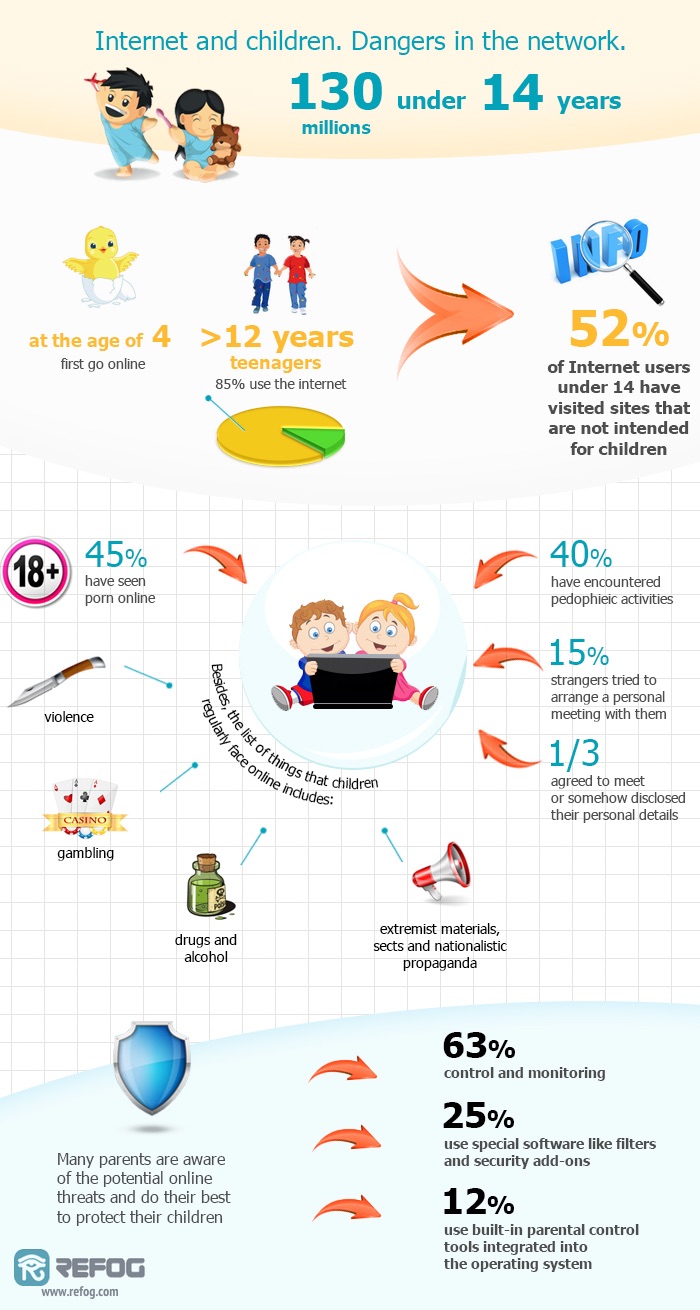
Not everything is rosy in the virtual world of online. According to resent research, some 45% of underage users will encounter pornography, while nearly 40% of minors will communicate with a pedophile without even knowing. And do we need to mention the “legal drugs”, religious sects presenting themselves like an eye candy, widely promoted online gambling resources with the only age verification being the “Yes, I’m over 18” checkbox? Some things are never meant for minors, yet they are just too easy to find, too easy to encounter and too easy to do.
REFOG Personal Monitor offers a non-intrusive way to monitor what your kids do online without blocking or restricting their activities in any way. By activating parental control on your computer, you’ll always be aware of who your kids chat with, and will be able to take measures if they are unable to deal with a dubious offer.
Watch. Do Not Block.
Any attempt to block or restrict those resources is destined to fail. Forbidden fruit is sweet, and every block or restriction you impose is way too easy to overcome for the curious mind. By attempting to block certain types of resources you will likely reach just the opposite.
Blocking and controlling your kids’ online activities are different things. By installing parental control software you’ll always know what your kids are doing with your computer in general, and learn about their online interests in particular. All you need to enable child monitoring is REFOG Personal Monitor.
REFOG Personal Monitor can control:
-
 Social Networks. Learn who your kids chat with on Facebook, Twitter, Google+ and many other social networks as well as their respective messengers.
 -
 Chats and Voice Calls. Monitor who your kids chat with on Facebook, Whatsapp, Viber, Telegram and the many other instant messaging and calling apps.
 -
 Using the Webcam. Check your kids with a webcam by viewing the automatic captures.
 -
 Web Sites. Discover what Web sites your kids visit, which Web pages they read and how much time they spend on each Web resource.
 -
 Keystrokes. Capture raw key presses to review messages sent in unrecognized chats, forums or messaging apps.
 -
 Reports. Comprehensive reports are available and delivered automatically to your online account.
Your piece of mind is just one click away Download REFOG Personal Monitor and try it free for 3 days!
Windows 11,10,8 ; macOS 10-15
REFOG Personal Monitor is completely safe and family friendly, and is not considered a threat by even the most paranoid antivirus apps. This parental control software has had more than 2.5 million installations during the last 10 years. Today, REFOG Personal Monitor is used by families and parents all over the world.
Download REFOG Personal Monitor to protect your kids against online threats. Try the evaluation version free of charge!
How It Works?
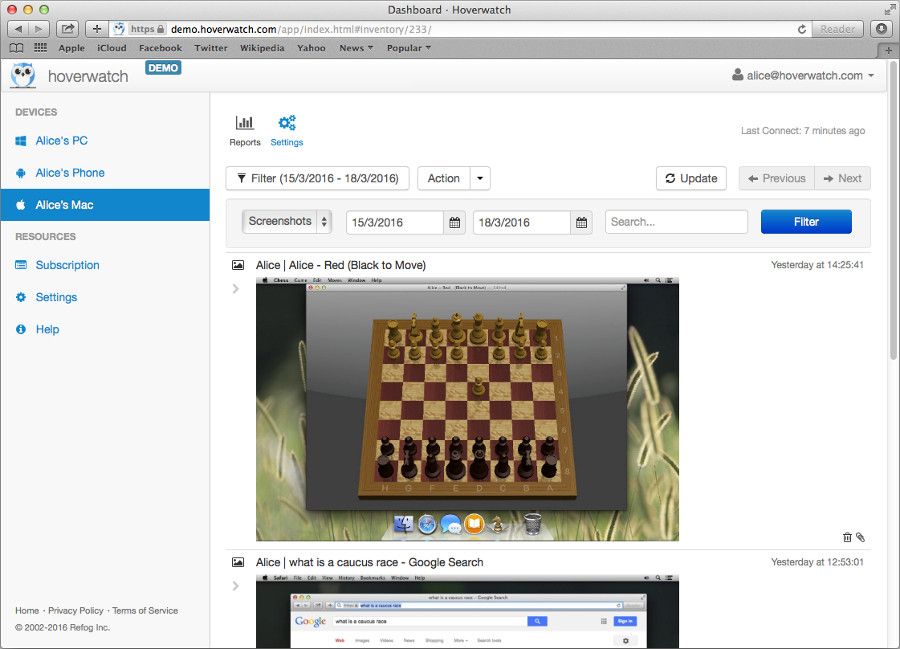
REFOG Personal Monitor works by logging everything that’s happening on your PC while your kids are in front of it. Parental control mode is available for a wide list of instant messengers and chat applications, Web browsers, email clients and other online applications. REFOG Personal Monitor saves chats and voice conversations, logs sent and received messages, and records messages submitted in various blogs and online forums. Custom stop-word lists are available to alert you immediately in case a suspected threat is detected.
Your Satisfaction Guaranteed
We are proud to feature a 100% satisfaction guarantee. We guarantee to deliver the best protection against online threads for your kids. If you are not satisfied with the performance of REFOG Personal Monitor within the first 7 days after purchase, we’ll refund your order.
In addition, you are always welcome to try the evaluation version of REFOG Personal Monitor for absolutely free!
Not Just a Keylogger
When it comes to protecting your kids against modern threats, traditional keyloggers are a thing of distant past. To reliably monitor your kids’ activities capturing keystrokes or logging active applications is no longer enough. REFOG Personal Monitor delivers the complete parental control and child monitoring solution by maintaining a database of recognized social networks, applications and Web browsers in order to capture all parties participating in a chat or social conversation.
Take Full Control Over Your Kids Communications
Social networks are proliferating. They are literally everywhere: on your computer, smartphone, tablet… fridges and coffee makers to follow soon. Social networks only require nominal authentication, allowing de-facto anonymity by verifying nothing more than an email account.
Social networks are well known to pedophiles, drug dealers and crooks of all kinds. You can’t filter them out, and you can’t block social network simply because they are so proliferating and easily accessible.
With REFOG’s parental control software protecting your kids against malicious persons in social networks becomes easy. Simply install REFOG Personal Monitor, and the child monitoring tool will record your kids’ communications occurring in popular social networks, instant messengers, chats, blogs and forums. Just open the report to discover who your kids talked to and what they’ve been offered.
Unlike simple keyloggers, REFOG Personal Monitor is a dedicated child monitoring solution and a fully featured parental control tool. REFOG Personal Monitor recognizes most popular social networks and communication apps, capturing not only your kids’ words, but storing the entire conversation complete with sent and received messages, recipient info, nicknames, timestamps and IP addresses.
Your Privacy
Are you concerned about your kids personal information? Rest assured that REFOG Personal Monitor does not collect, store or transmit personal information. You are in full control of everything logged by REFOG Personal Monitor down to the last bit. All information is stored locally or emailed directly to you via an email server of your choice.
Safe, Secure and Approved by Antiviruses
REFOG Personal Monitor is digitally signed child monitoring parental control software delivered by a reputable company. We’re in the business for more than 10 years. All our tools carry secure digital signatures. As a result, REFOG Personal Monitor is not considered a threat by most reputable antivirus programs. If you encounter a rare occasion where REFOG Personal Monitor is blocked or otherwise interfered by an antivirus product, please contact us, and we’ll take our best effort to fix the issue as soon as possible.


