Free Keystroke Logger for Windows

I have been using REFOG Logger for over 2 years now and its a brilliant piece of software. It allows you to monitor everything happening on the host computer and you dont have to be behind the computer to see what is hapenning. All keystrokes, screen shots etc are sent to you defined refog cloud. I now know what my kids are doing on their computer and that enables me to correct them once they visit sites that are not appropriate for their age. Good work to you and your company

Jaseph

Windows 11,10,8 ; macOS 10-15

How It Works

  • Create Account

    Enter your email and choose a password to set up your Refog account.

  • Install and Set Up

    Download Refog Personal Monitor from your account and install it on the Windows PC you want to monitor.

  • View Remotely Online

    Log in from any browser to your secure Refog account to access all recorded data.

Refog Keystroke Logger is a free keystroke logging tool for Windows 11 and 10. It quietly captures every keystroke, chat conversation, website visit, and app launch on your family PC — with all data accessible remotely via a cloud dashboard. Designed for parents who need unobtrusive insight into their children's online activities. From $30/month. Start your free 3-day trial.

Refog is a free keystroke logger for Windows 11 and 10 that quietly records every keystroke, website, chat and app launched on your family PC. The keystroke logger has been trusted by parents since 2002 and sends every recorded keystroke to a secure cloud dashboard you can open from any browser.

DOWNLOAD FREE KEYSTROKE LOGGER Instant Download | Works on Windows 11, 10, 8

How the Refog Keystroke Logger Works (3 Simple Steps)

  1. Install in minutes — Download the free installer and run it on the Windows PC you want to monitor. Setup takes less than two minutes and requires no technical skills.
  2. Let it record silently — Refog starts automatically and runs invisibly in the background, capturing every keystroke, chat message, visited website and launched application without interrupting your child.
  3. Review logs from anywhere — Open your Refog cloud account from any phone, tablet or computer browser to read the full activity timeline, screenshots and typed text whenever you want.

What Refog Records

Unlike a basic keylogger that only captures typed text, Refog is a complete monitoring solution that tracks every kind of activity a modern child has on a Windows PC.

Unlimited Typing Capture

Refog records every character typed in every Windows application — browsers, messengers, email, documents, games and hidden incognito windows. Each entry is timestamped and tagged with the program that was active, so you see exactly what was typed, where, and when. There is no daily limit — the software records as long as the PC is switched on.
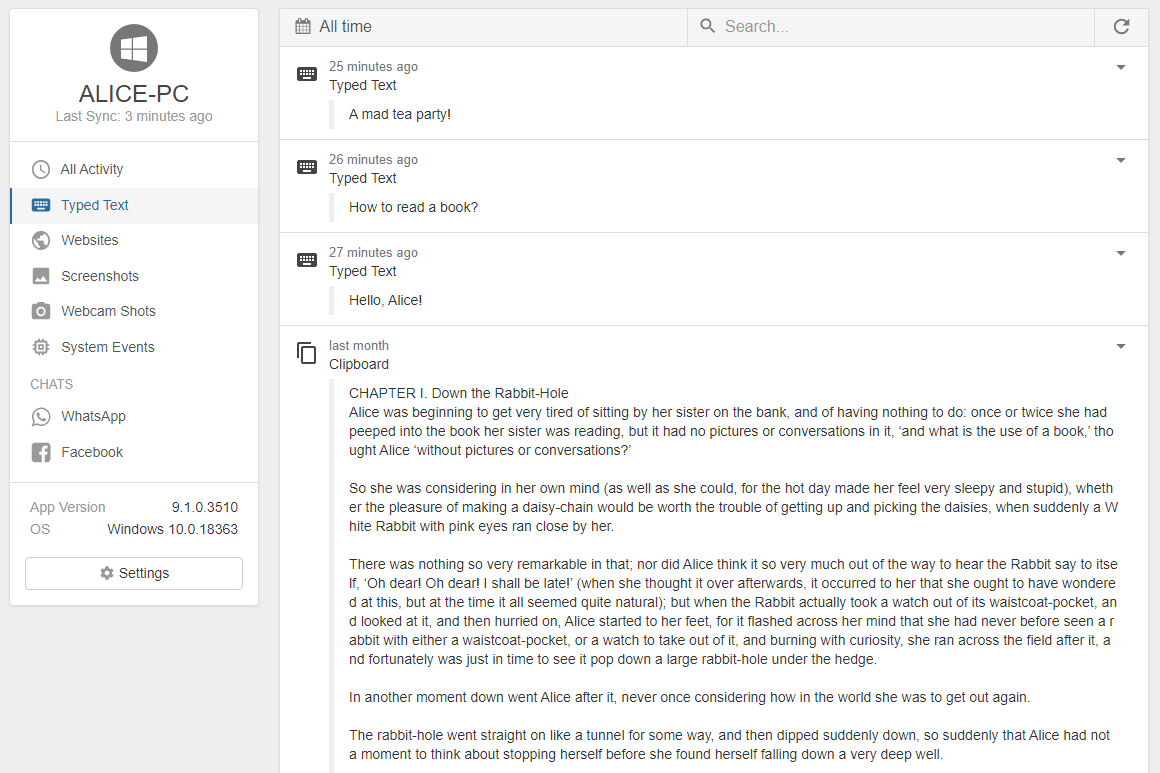
Refog keystroke logger interface showing captured keystrokes on Windows 11

Visited Websites Log

Refog also works as a website monitor. It logs every URL opened in Chrome, Edge, Firefox and Opera together with the page title and the time spent on each site, so you can spot risky websites at a glance.

Chat & Social Network Capture

Refog automatically recognises conversations in WhatsApp Web, Messenger, Instagram, Discord, Telegram, Skype and dozens of other apps and groups them by contact. You see both sides of the conversation reconstructed from the captured text, which is something a generic keylogger cannot do.

Application and Game Usage Tracking

Refog logs every application and game that is launched, how long it was used, and when. You will know instantly if Fortnite ran for four hours during homework time or if an unknown program was installed.

Periodic Desktop Screenshots

In addition to text, the software takes periodic screenshots of the desktop, so you can see the full visual context around any typed message — memes, video chats, pictures and anything that plain text logs alone would miss.
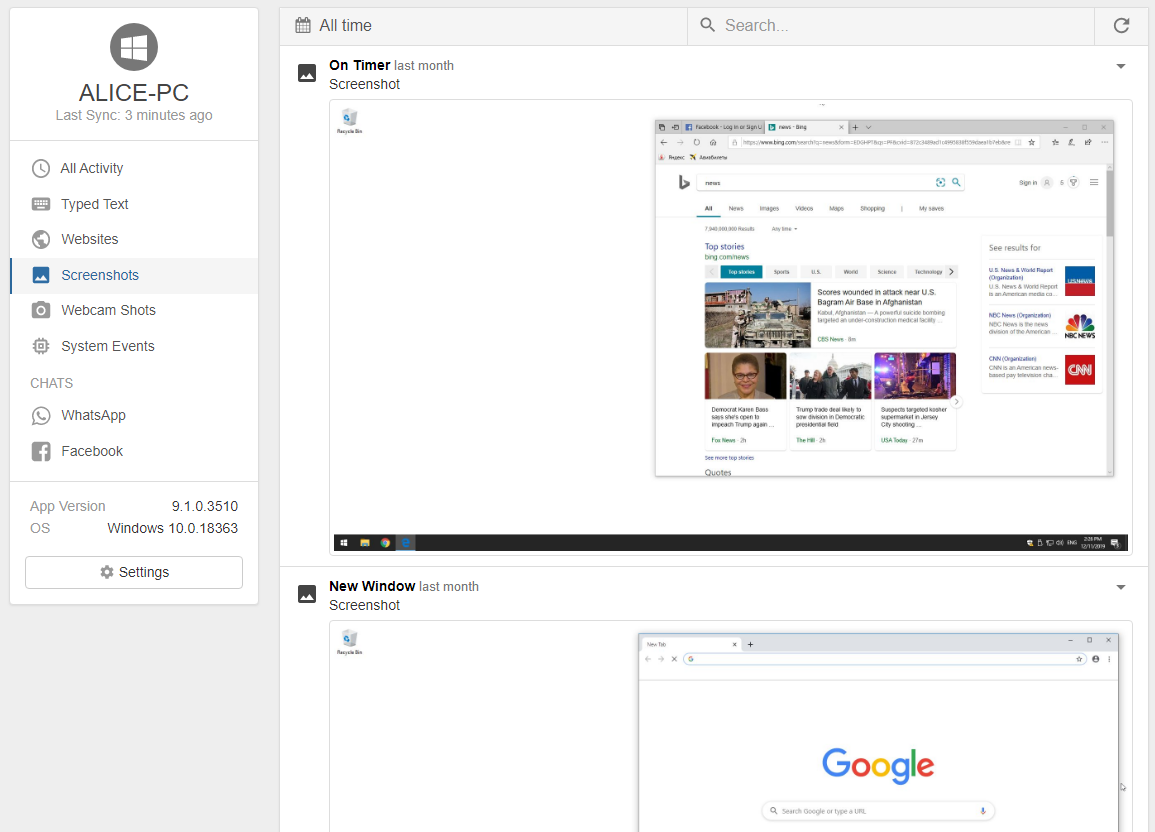
Refog periodic desktop screenshots

Invisible Mode — Monitoring Without Distraction

Refog runs in stealth: no tray icon, no start-menu entry, no pop-ups. Children simply use the PC as usual while the software silently collects activity in the background. A parent hotkey brings up the dashboard when you need to check settings, and a master password keeps the logs private even if someone else uses the same account.

Cloud Dashboard — Review Logs From Anywhere

Refog is a cloud-based keystroke logger. Every typed entry, screenshot and website is uploaded to your secure Refog account, so you do not need to touch the monitored PC to read the logs. Open the online dashboard from your iPhone, Android phone, iPad or any computer browser and review today's activity from the office, from a café or from another country.

Designed for Families, Not Spies

Refog is family monitoring software, not corporate spyware. The product has been built for parents since 2002 with one goal: helping you keep children safe online without turning your home into a surveillance lab.

Why Refog is not malware:

  • Refog is signed commercial software — not a cracked key logger from a forum.
  • It is installed by the PC owner (the parent) on a family computer, which is perfectly legal in the United States, UK, Canada and the EU.
  • All logs are stored in your personal Refog account, not shared with third parties.
  • You can uninstall Refog at any time from the hidden dashboard.

If you are looking for a parental monitoring tool that respects both your child and your data, Refog is the right choice.

Trusted by Parents Since 2002

"I have been using REFOG Logger for over 2 years now and it's a brilliant piece of software. All keystrokes and screenshots are sent to my Refog cloud. I now know what my kids are doing on their computer and that enables me to correct them once they visit sites that are not appropriate for their age."

— Jaseph, Parent

"I was looking for a simple way to know what my kids were doing online. Refog was the perfect solution — easy to install and completely invisible."

— Mark D., Parent

"The cloud dashboard is what sold me. I can check the activity logs from my phone while I am at work and talk to my daughter about anything worrying the same evening."

— Jennifer L., Mom

Ready to Start? Download the Refog Keystroke Logger

Join hundreds of thousands of parents who protect their children with Refog. The download is free, recording works indefinitely, and setup takes less than two minutes on any Windows 11 or Windows 10 PC.

DOWNLOAD FREE KEYSTROKE LOGGER Free download for Windows 11, 10, 8

Keystroke Logger FAQ — Free Keystroke Logging Software for Windows

What is a keystroke logger and how does the Refog keystroke logger work? plus minus

A keystroke logger (also called a key logger) is a program that records every character typed on a computer keyboard. Refog runs quietly on a Windows PC and captures typed text, visited websites, chat messages and launched applications in real time. Everything is timestamped and uploaded to a private cloud dashboard, so parents can review the full log from any browser.

Is Refog a good keystroke logger for Windows 11, Windows 10 and Windows 8? plus minus

Yes — Refog is often rated among the best family keyloggers for Windows. A single installer works on Windows 11, Windows 10 and Windows 8 in both 32-bit and 64-bit editions, with no extra drivers. It is Windows-only; there is no separate build for macOS, Chromebook, iOS or Android on this page.

Is it legal for parents to use a keystroke logger on a child's computer? plus minus

In most jurisdictions parents may legally monitor their own minor children on devices they own, and Refog is designed exactly for that family use case. Laws vary by country and by U.S. state, so confirm the local rules before installing any monitoring software. Refog is not intended for monitoring adults, employees or anyone without proper authority.

Can I run Refog as an invisible (stealth) keystroke logger on Windows? plus minus

Yes. Refog ships with an invisible stealth mode that runs in the background with no taskbar button, tray icon or desktop window. Parents open the dashboard with a configurable hotkey and password, so children do not notice it. An optional visible mode is also available for parents who prefer open, transparent monitoring — an approach many family therapists recommend.

Will antivirus software detect the Refog keystroke logger as a virus? plus minus

Some antivirus products flag any key logger because typing capture is a technique also used by malware, even though Refog is legitimate family software. The installer is digitally signed, and Refog publishes allowlist instructions for Windows Defender and other common antivirus suites. If your antivirus blocks installation, adding Refog to its exclusion list resolves the warning — a normal step for any parental monitoring tool.

What exactly does the Refog keystroke logger record — keystrokes, websites, chats and screenshots? plus minus

Refog records every character typed in any Windows application, visited website URLs in Chrome, Edge and Firefox, conversations in popular messengers and social networks, launched programs and games with time spent in each, and periodic desktop screenshots. This combination of typing capture, website tracking and screen recording makes it a full monitoring suite rather than a basic keylogger. All events appear in the parent's cloud dashboard grouped by date, application and child account.

Can I view the keystroke logs online from my phone or another computer? plus minus

Yes — Refog is a cloud-based, online keystroke logger. Recorded activity is uploaded to a private Refog cloud account, so parents can read logs remotely from any device with a web browser: iPhone, Android phone, iPad, Mac or another Windows PC. No software install is required on the viewing device, and the remote dashboard is protected by your personal Refog password. The monitored Windows PC needs an internet connection for data to sync.

How do I install the Refog keystroke logger on a Windows 11 or Windows 10 PC? plus minus

Installing Refog takes about five minutes. Download the free installer from your Refog account, run it with administrator rights on the Windows 11 or Windows 10 PC you want to monitor, sign in with the same account credentials and choose visible or invisible mode. After installation it immediately starts recording and uploading to the cloud dashboard — no extra configuration is needed.

Is Refog the best free keystroke logger for parents and families? plus minus

Refog is consistently ranked among the best free keyloggers for parents because the core recording feature works indefinitely with no time limit and no credit card required to start. Unlike a generic free key logger, it is a purpose-built family tool: it groups activity by child, detects chat conversations and never sells monitoring data. Parents who want a free solution for Windows 11 or Windows 10 typically start with the free download and upgrade only if they need extended history or multi-PC support.

How often does Refog sync new keystrokes to the cloud dashboard? plus minus

Refog uploads new typing, screenshots and website visits to the cloud dashboard every few minutes whenever the monitored Windows PC is online, so parents get near real-time monitoring. If the PC is offline, events are stored locally and synced the next time the computer reconnects to the internet — nothing is lost.

How does Refog compare to free keystroke logging software and Windows parental controls? plus minus

Most free monitoring software either stops after a short trial or captures only plain text. Refog offers true free keystroke logging plus website tracking, chat capture and screenshots, and combines them in one cloud dashboard. Windows Family Safety, by contrast, only handles time limits, age ratings and URL category filters — it is not a keystroke logger at all. Many families use both together: Windows Family Safety to set boundaries, and Refog for detailed activity records.

How do I uninstall the Refog keystroke logger or delete collected keystrokes? plus minus

Refog can be uninstalled at any time from its dashboard using the account password, which removes the software completely from the Windows PC. Collected logs stored in the Refog cloud can be deleted from the parent's account settings, and closing the account erases any remaining data. Uninstalling always requires the account password, so children cannot remove it themselves.