
How to Reset and Retrain Your Teen's Feed Algorithm
Step-by-step: reset your teen's TikTok, Instagram, YouTube and Snapchat feeds, then run the two-week retrain that stops the old content creeping back.

Can you reset your teen's algorithm?
Yes — on most of the apps your teen uses, you can wipe the slate in a couple of minutes. TikTok has Refresh your For You feed, Instagram has Reset suggested content, YouTube resets when you delete and pause watch history, and Snapchat offers a true reset only to users in the EEA, the UK and Switzerland.
What none of them can do is keep the feed clean. A reset erases what the app has learned about your teen; then the app starts learning again, from the same scrolling habits that built the old feed. So this guide has two halves: the reset, app by app, and the two weeks of retraining that decide whether it sticks.
Why a reset on its own doesn't last

Because feeds learn from attention, not from what your teen says they want. Every major platform describes the same basic machine. TikTok says a strong signal such as finishing a longer video carries more weight than a weak one; YouTube lists clicks, watch time, surveys, shares, likes and dislikes; and Instagram's head, Adam Mosseri, has explained that in Feed the app looks most closely at how likely you are to spend a few seconds on a post, comment on it, like it, share it and tap on the profile photo (Instagram, 2023).
Notice how little it takes: a few seconds. A teen who pauses on a “what I eat in a day” video — even out of unease — has told the feed something. After a reset, the same pause teaches the same lesson, and the old feed rebuilds itself.
It can rebuild quickly. When the Center for Countering Digital Hate set up TikTok accounts registered as 13-year-olds that paused on and liked body-image and mental-health videos, the app recommended suicide content within 2.6 minutes and eating-disorder content within 8 (CCDH, 2022). In Amnesty International's 2025 test in France, three accounts registered as 13 had feeds almost entirely about mental health within 15 to 20 minutes (Amnesty, 2025). These were test accounts built to probe the worst case, not a forecast of your teen's feed — but they explain why the first days after a reset matter most.
Regulators are pushing in the same direction. The UK's Ofcom children's codes, in force since July 2025, require riskier services to filter the most harmful content out of children's feeds; EU guidelines under the Digital Services Act tell platforms to put children's explicit choices ahead of behavioural signals; and New York's SAFE for Kids Act rules, taking effect in January 2027, default under-18s to feeds from accounts they follow unless a parent consents. Useful direction — but none of it resets your teen's feed tonight. For the mechanics in more depth, see how social media algorithms work.
Before you start: on their phone, with them

To reset a teen's feed, you have to do it from their account, on their device. None of the family tools — TikTok Family Pairing, Instagram supervision, YouTube's supervised teen accounts, Snapchat Family Center — includes a remote reset. That is less of a limitation than it sounds: a reset your teen didn't choose tends to be undone by the same scrolling that built the old feed.
It also helps to know what the family tools do show you. TikTok Family Pairing lets you add keyword filters (your teen can see the list by default) and, since July 2025, shows which Manage topics choices your teen has made. Since May 2026, Instagram supervision also shows the general topics your teen engages with (Meta, 2026). Neither shows you the actual videos in the feed — so the useful information comes from your teen.
A worked example: the fitness feed
Say your 15-year-old started following gym creators in the spring. By autumn, her Reels and For You page are mostly calorie counts, “what I eat in a day” videos and before-and-after bodies. She hasn't raised it, but she mentions, half-joking, that she “can't escape” them. An opener that doesn't put her on the defensive:
“I've noticed your feed's gone heavy on diet stuff lately. Is that what you actually want to see, or has it kind of taken over?”
If she says it has taken over — many teens will, if the question comes without judgement — offer the reset as her tool, not your rule: “There's a setting that wipes what the app thinks you like. Want to do it together and pick what replaces it?”
Then agree on three things before touching a setting: what she wants less of, what she wants more of (a sport she plays, cooking, a creator she trusts), and a check-in in two weeks. Write the “more of” list down. After a refresh, TikTok starts by showing popular videos and learns from what she engages with — a reset with nothing lined up to replace the old content leaves the feed to fill itself. (If the diet content has already changed how she eats or talks about her body, the reset can wait — start with when a reset isn't the answer.)
How to reset TikTok's For You feed
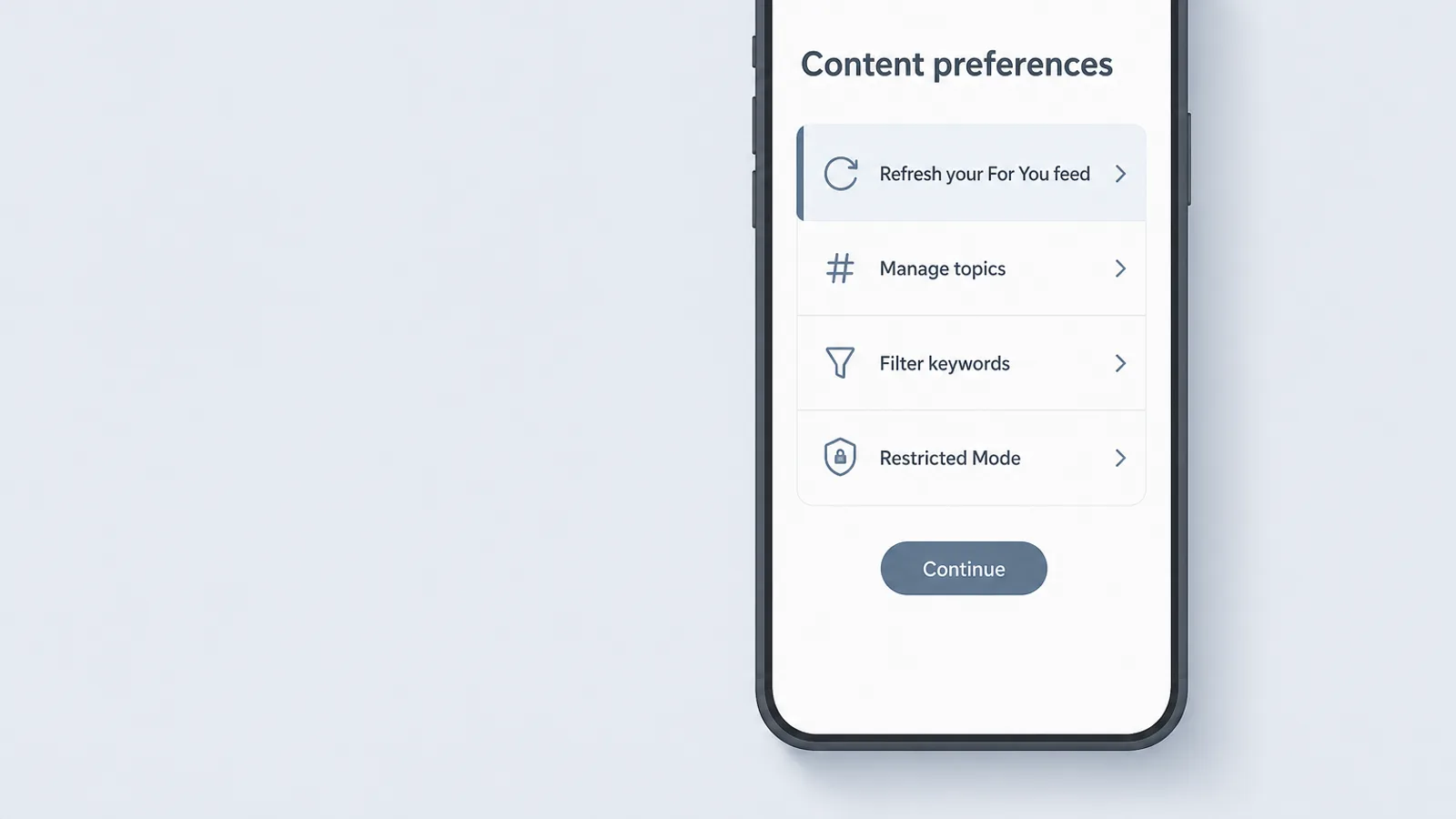
To reset TikTok, use Refresh your For You feed, available since March 2023. Menu labels can shift slightly between app versions:
- Open TikTok and tap Profile, then the ☰ menu in the top corner.
- Tap Settings and privacy, then Content preferences.
- Tap Refresh your For You feed and follow the prompts to confirm.
When enabled, this feature allows someone to view content on their For You feed as if they just signed up for TikTok. Our recommendation system will then begin to surface more content based on new interactions.
— TikTok Newsroom, announcing the For You feed refresh (March 2023)
What it doesn't touch: the accounts your teen follows, the Following feed, and settings already switched on. It can't be undone — the old personalisation is simply gone. TikTok hasn't published a limit on how often it can be used.
Then set the guardrails
- Manage topics (in Content preferences): sliders for broad topics such as sports, travel or creative arts. They turn a topic up or down; they won't remove it entirely.
- Keyword filters (in Content preferences): add the words behind the content your teen wants less of. Since June 2025, TikTok says its filters also catch synonyms and slang variations (TikTok Newsroom).
- Not interested: long-press any video and tap Not interested. This is the signal to use every time the old content reappears.
- Restricted Mode (in Content preferences): a passcode-protected filter for mature content — worth considering for younger teens, though it is a blunt tool.
If you use Family Pairing, you can add your own keyword filters from your phone, and your teen can see that list by default. That is the right balance for a feed reset: shared guardrails, no secret list.
How to reset Instagram's suggested content
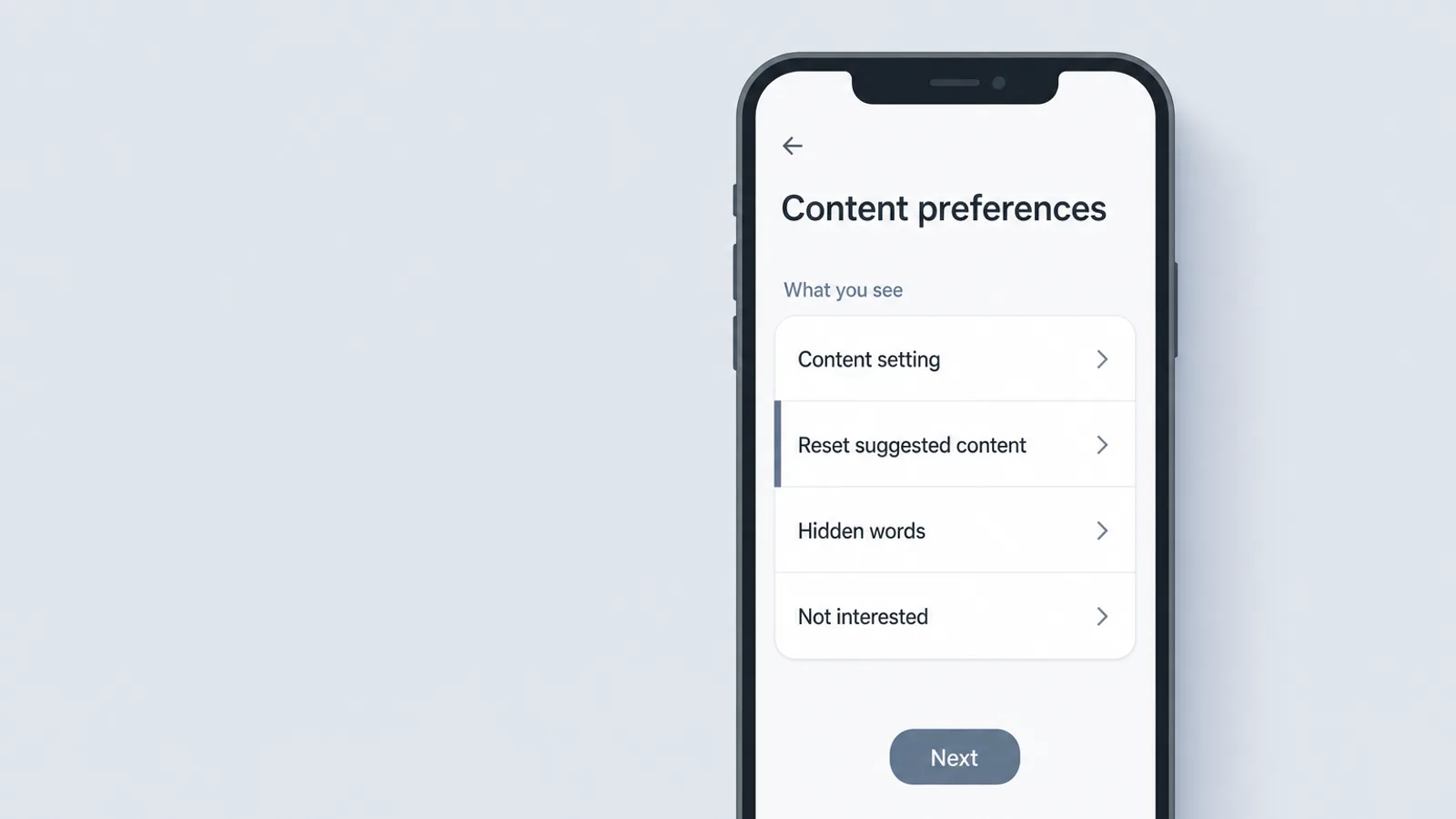
To reset Instagram, use Reset suggested content, introduced in November 2024. It works in the app, not on a computer:
- Go to your teen's profile and tap the ☰ menu (Settings and activity).
- Under What you see, tap Content preferences.
- Tap Reset suggested content, review the next screen, and confirm.
It clears recommendations across Explore, Reels and Feed, and offers to walk through the accounts your teen follows so they can unfollow any that feed the old content. Don't skip that step: the reset doesn't unfollow anyone for you, and a followed account keeps posting straight into the feed.
Your recommendations will start to personalize again over time, showing new content based on the content and accounts you interact with.
— Meta, introducing the Instagram recommendations reset (November 2024)
Your Algorithm: steer it instead of guessing
Since June 2026, Your Algorithm — reached from the icon at the top right of Reels or Explore — shows the interests Instagram thinks your teen has and lets them add or remove topics, with changes applied across Feed, Reels and Explore. It was launched in English, so it may not appear if your teen's app runs in another language. Sit with it together: seeing the list is often the moment a teen says, “wait, that's not me.”
While you're in Content preferences, check the Teen Account content setting. Under-18s default to a 13+ setting. There is also a stricter Limited content setting, while moving to a looser one needs a parent's permission.
Two more tools: Not interested in any suggested post's ⋯ menu, and Hidden Words, which also filters suggested posts by words in the caption. If you supervise the account, you'll see the general topics your teen engages with — not the posts themselves.
How to reset YouTube recommendations
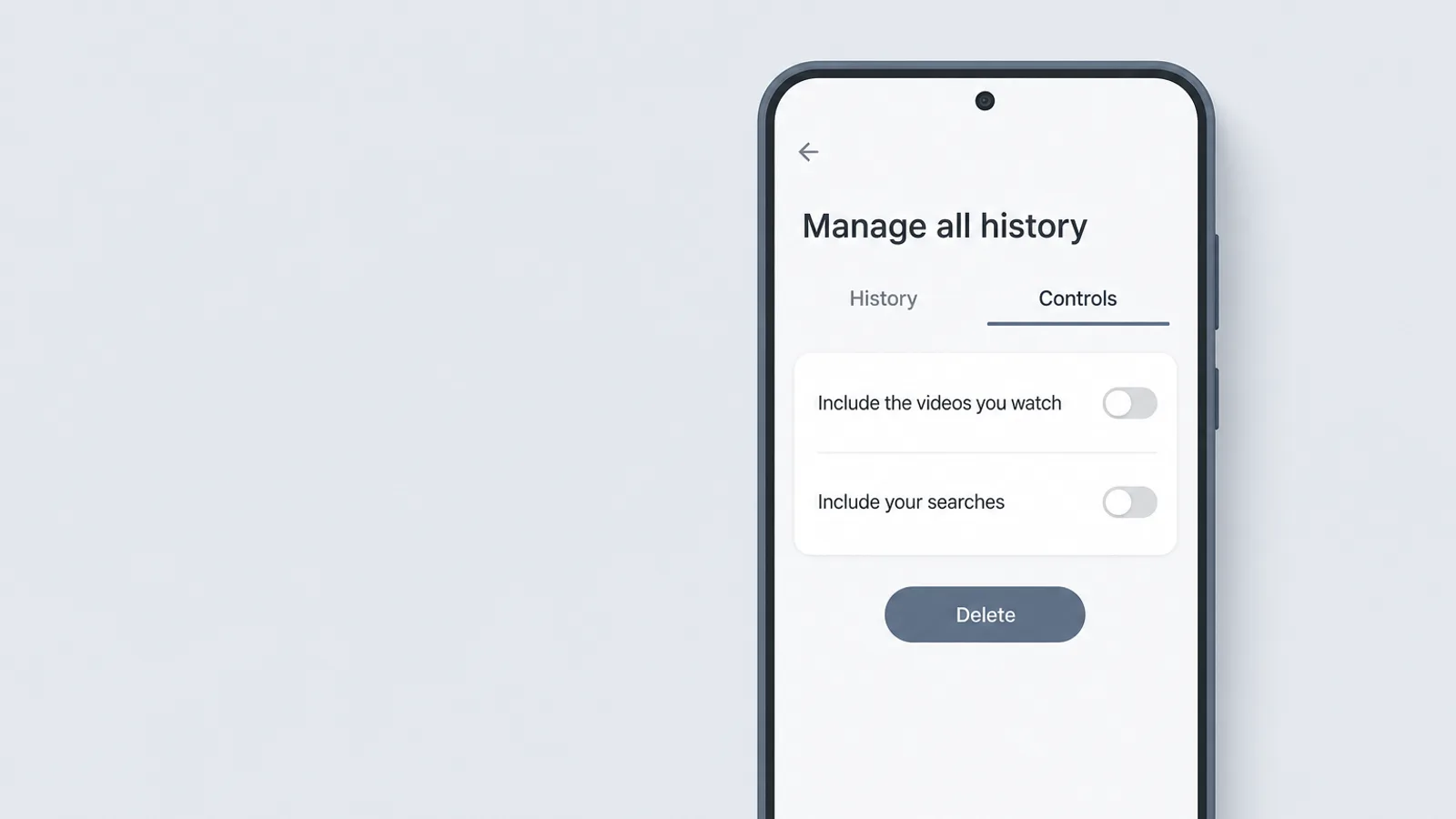
To reset YouTube, delete and pause watch history — there is no single reset button:
- Tap the profile photo, then Settings, then Manage all history.
- Tap Delete and choose a time range — “all time” for a full reset.
- Open the Controls tab and turn off Include the YouTube videos you watch (and, if you like, Include your searches on YouTube). On a computer, the same controls are at myactivity.google.com.
YouTube is direct about the effect: if you delete watch history, it won't base future recommendations on that content (YouTube Help). And YouTube's help pages say that with watch history off and no significant prior history, recommendations are removed from the Home page, leaving the search bar and menu. For some teens, that quiet Home screen is the most useful setting in this guide. One thing a wipe doesn't touch: subscriptions — channels your teen subscribes to keep appearing until they unsubscribe.
If a full wipe feels like too much, prune instead: remove individual videos from history, and use ⋮ > Not interested or Don't recommend channel on anything unwanted; on a Shorts shelf, Show fewer Shorts. For accounts YouTube identifies as belonging to teens, it already limits repeated recommendations of videos that compare bodies, idealise particular fitness levels or weights, or show social aggression — a useful floor, not a filter.
Snapchat: what you can and can't reset
Whether you can reset Snapchat depends on where you live. Snapchat's help pages say users in the EEA, the UK and Switzerland can reset their personalised content feed or switch off personalised recommendations (look in Settings > Personalization Controls, or tap “Why am I seeing this content?”). Snapchat notes that most, but not all, personalisation signals reset. If your teen's app doesn't offer the option, there is no reset to use.
Without it, the levers are behavioural: press and hold a Story in Discover to hide it, skip what's unwanted, and watch longer what your teen actually enjoys. Snapchat says plainly that you can't completely disable a topic, theme or the Discover section. If you use Family Center, turn on Hide Sensitive Content, which limits sensitive or suggestive content in Stories and Spotlight — and which Snapchat itself says won't catch everything.
The two-week retrain: the signals that work

To make a reset stick, send the feed explicit signals for the next two weeks — every time the old content appears, not just the first few times. The research says explicit buttons beat scrolling past, but unevenly:
| Control | What the study found | Source and caveat |
|---|---|---|
| Don't recommend channel (YouTube) | Prevented 43% of unwanted recommendations | Mozilla, 2022 — crowdsourced data from 20,000+ volunteers |
| Remove from watch history (YouTube) | Prevented 29% | Mozilla, 2022 |
| Dislike (YouTube) | Prevented 12% | Mozilla, 2022 |
| Not interested (YouTube, Mozilla) | Prevented 11% | Mozilla, 2022 — crowdsourced real-world use |
| Not interested (YouTube, Michigan) | Removed 88% of unwanted homepage recommendations on average | University of Michigan test with scripted accounts; barely affected “up next” suggestions |
| Not interested (TikTok) | In one small cooking-video experiment, cut the topic from about 30% of the feed to under 5%, versus 16% for simply swiping past | Northeastern University, 2026 preprint — a small test; feeds often drifted back once the account engaged with the topic again |
The takeaway isn't a percentage. It's that the explicit buttons carry more weight than skipping, that the effect fades when you stop, and that anyone promising the feed will be fixed “in 48 hours” is guessing.
A two-week plan
- Day 1: reset together, add three to five keyword filters or topic changes from the “less of” list, and follow two or three accounts from the “more of” list.
- Days 2–7: every unwanted video gets Not interested or Don't recommend channel — not just a swipe. Content from the “more of” list gets watched to the end, because watch time is one of the strongest signals a feed reads.
- Day 7: a two-minute look at the feed together. If the old content is creeping back, check follows and recent searches — they often keep feeding it.
- Day 14: the check-in you agreed on. What's better, what's back, and does your teen want to keep going? Let them lead the answer.
Expect some relapse. The Northeastern researchers found TikTok feeds often drifted back to a topic once the account started engaging with it again. And platform safety tools in general are imperfect: an independent 2025 audit of 47 Instagram teen safety features — not the reset itself — rated 30 of them as substantially ineffective or no longer available, findings Meta disputes (Molly Rose Foundation and partners, 2025). Tools help; they don't finish the job. The skill you are really building is a teen who notices the drift before you do.
When a reset isn't the answer
A reset is the right tool for a feed that drifted. It is the wrong tool when the feed reflects something your teen is going through. If the content keeps returning to self-harm, suicide or disordered eating — or your teen is searching for it — treat the feed as a signal, not the problem.
- Talk first, calmly. Ask what they've been seeing and how it makes them feel, and listen more than you speak. If you are worried, ask directly whether they have had thoughts of hurting themselves — asking does not put the idea in their head.
- Bring in help. If you've noticed changes in eating, sleep, mood or withdrawal, contact their doctor or a mental-health professional soon — not after the two-week retrain.
- Know the crisis lines. In the US, call or text 988 (the 988 Suicide & Crisis Lifeline) any time. In any country, including the US, findahelpline.com lists local crisis and eating-disorder helplines. If there is immediate danger, call 911 or your local emergency number.
Taking the phone away in that moment can backfire: it can close the very channel you most need open. For the wider picture, see our guide to protecting teens from harmful content and our look at compulsive scrolling.
Frequently asked questions
How do I reset my teen's TikTok For You page?
On your teen's phone, open TikTok and go to Profile, the ☰ menu, Settings and privacy, Content preferences, then Refresh your For You feed. TikTok then shows the feed as if they had just signed up and starts personalising again from new activity. Follows and existing settings stay, and the refresh can't be undone. Follow it with keyword filters and Manage topics, and use Not interested on anything unwanted — otherwise the old feed rebuilds from the same habits.
How do I reset the Instagram algorithm?
In the Instagram app (not on a computer), open the profile menu, go to Content preferences and tap Reset suggested content. It clears recommendations across Explore, Reels and Feed and offers to walk through the accounts your teen follows so they can unfollow any that feed the old content. Recommendations personalise again over time, so steer them: use Your Algorithm to add or remove topics, and Not interested on posts your teen doesn't want.
How do I reset YouTube recommendations?
YouTube has no single reset button. Tap the profile photo, then Settings, then Manage all history; delete watch history for the period you want to wipe, and in the Controls tab turn off watch history. YouTube says deleted history no longer shapes recommendations, and its help pages say that with history off and no significant prior history, recommendations are removed from the Home page. For a lighter touch, use Not interested and Don't recommend channel instead.
Can I reset my child's algorithm from my own phone?
No. None of the family tools — TikTok Family Pairing, Instagram supervision, YouTube's supervised teen accounts or Snapchat Family Center — includes a remote feed reset. You have to do it from your teen's account, on their device. From your own phone you can add TikTok keyword filters, see the topics your teen chose, turn on Snapchat's Hide Sensitive Content, or see the general topics they engage with on Instagram. That makes a reset a joint decision, which is also why it tends to last.
How long does it take to retrain an algorithm after a reset?
No platform publishes a timeline, and claims like “48 hours” come from marketing blogs, not evidence. What research does show is that feeds respond quickly to what a viewer lingers on, and that explicit signals such as Not interested reduce unwanted content better than scrolling past. Plan on two weeks of deliberate signals, then check the feed together; expect some drift back if the signals stop.
Does the “Not interested” button actually work?
Partly. In Mozilla's crowdsourced 2022 study of YouTube, Not interested prevented only 11% of unwanted recommendations, while Don't recommend channel prevented 43%. A University of Michigan test found Not interested removed 88% of unwanted recommendations from the YouTube homepage on average, and in a small 2026 Northeastern study of TikTok it usually beat simply swiping past. The consistent finding: explicit buttons help more than skipping, and the effect fades when you stop using them.
Why does the same content come back after a reset?
Because a reset erases what the app learned, not the habits that taught it. Feeds are driven mostly by attention — how long a video is watched, whether it is rewatched or shared — so the same pauses rebuild the same feed. Accounts your teen still follows and past searches also keep feeding it. Unfollow those accounts, add keyword filters, and use the explicit buttons each time the content reappears.