Hoverwatch SMS Monitor is a visible Android monitoring tool that captures every text message sent and received, records phone calls, and logs real-time and historical GPS locations. Designed for parents monitoring their own child’s device with the child’s awareness, and for protection against phone loss or theft. Sign up free.
Location & Activity Monitoring
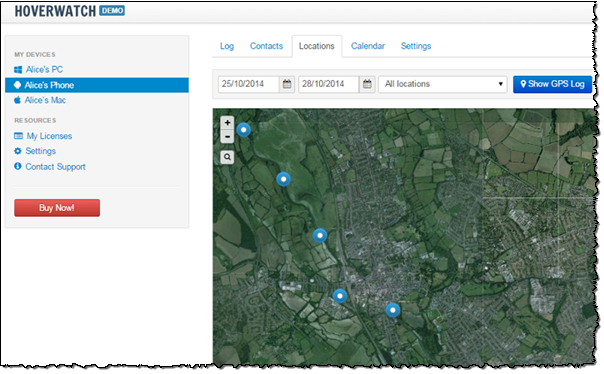
Hoverwatch helps protect your kids by helping you stay aware of their day. Not only does Hoverwatch record their calls and store every text message sent or received; in addition to that, it stores time and place they called or texted, letting you see where your kids were during the day, who they talked or chatted with, and what else they were doing there. The location is determined by using the phone’s GPS receiver. But even if no GPS is available in the device, Hoverwatch will still find the location of the phone by using data sent by the nearby cellular towers.
Hoverwatch can even take a snapshot of a person unlocking the phone, letting you see who used (or at least, who unlocked) your kids’ phones at any point.
Recording Calls and SMS Messages
Hoverwatch stores information about phone calls made or received, complete with Caller ID information, time and place of each call. But there’s more to Hoverwatch than simple call logging! You can enable Monitor Text Messages to record the actual voice conversations, helping you stay aware of who your kids are talking with. Please note that recording phone calls may require the consent of everyone on the call, depending on your local laws.
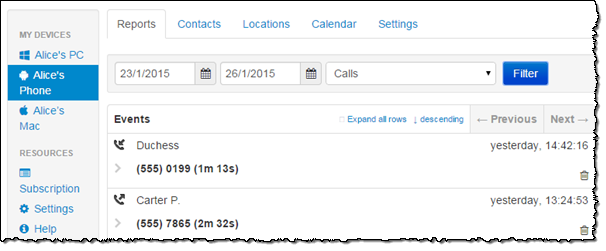
Same goes for SMS messages. Not only does Hoverwatch log the messages, but it stores their actual content along with any pictures or other attachments.
Real-Time and Historic Access Combined
There are many apps offering real-time access to your phone’s geolocation information. Other apps can build and visualize routes your phone went through during the day. Hoverwatch integrates both approaches, letting you see right away where your kids are at this very moment – and allowing you to see where they have been an hour, a day or a month ago.
Hoverwatch is much more than just a phone tracking app. The tool monitors and records a lot of data such as phone calls, text messages and applications, allowing you to see what your kids are up to or find out who they chatted with in that Starbucks last week.
Loss & Theft Protection
Hoverwatch protects your kids and their phones at the same time. Should the phone grow legs, you can always login to your Hoverwatch account and see where your phone is on the map, tracing its route from the moment it was stolen. Better yet, Hoverwatch can take snapshots of whoever unlocks the phone, helping you find out who has your device after it’s been lost.
Hoverwatch checks back periodically in background regardless of whether the phone is locked or not, helping you track down your lost device even if it’s never touched.
Your Choice of Maps
Many free Android tracking apps only support free OpenStreetMap. Hoverwatch supports both OpenStreetMap and Google Maps in Street and Satellite view, allowing you to choose maps with better coverage for your area.
What’s Recorded (and Why)
Hoverwatch records and transmits information required to track the location and usage of your phone. The following types of information are recorded:
-
GPS location Your phone’s GPS coordinates are continuously collected and periodically transmitted to the server. The data is used to discover the location of your device and to map phone activities during the past period.
-
Incoming and outgoing calls Hoverwatch collects information about made and received phone calls. Information about the other party is collected based on Caller ID and address book data. The data is transmitted and stored on the server.
-
Conversation recording Hoverwatch can monitor and record voice from phone calls, allowing parents to stay aware of their kids’ conversations. Recording calls may require the consent of everyone on the call, depending on your local laws.
-
SMS messages Text and multimedia messages are captured along with time and geolocation information. The full content and accompanying meta data are recorded, transmitted and stored on the server.
-
Unlock snapshots Hoverwatch can make photos of persons unlocking your phone. These images can be used to discover who used the phone at any point.


