Monitoring Software for Parents

I have used REFOG for a year, i have founded the most friendly monitoring software i have used. it gave me peace of mine knowing what my kids doing on the net. it gives a real detail of sites visited and every key strokes as well as detailed conversation,it is a real peace of mine tool i highly recommended. specially to concerned parents

K. Smith MI, USA

Windows 11,10,8 ; macOS 10-15

How It Works

  • Create Account

    Enter your email and choose a password to set up your Refog account.

  • Install and Set Up

    Download Refog Personal Monitor from your account and install it on the Windows PC you want to monitor.

  • View Remotely Online

    Log in from any browser to your secure Refog account to access all recorded data.

Refog Monitoring Software is a cloud-based family monitoring tool for Windows. It records keystrokes, websites, applications, chat messages, and takes screenshots — accessible from anywhere through your secure online account. Designed for parents who want visible, disclosed oversight of their children's PC activity. From $30/month. Start your free 3-day trial.

The Cloud-Based Solution

Watching your PC while you are away was never simpler. Just launch Refog Software, type your login and password and log in to your cloud account from anywhere in the world!
Monitoring Software

Perfect for Family Use

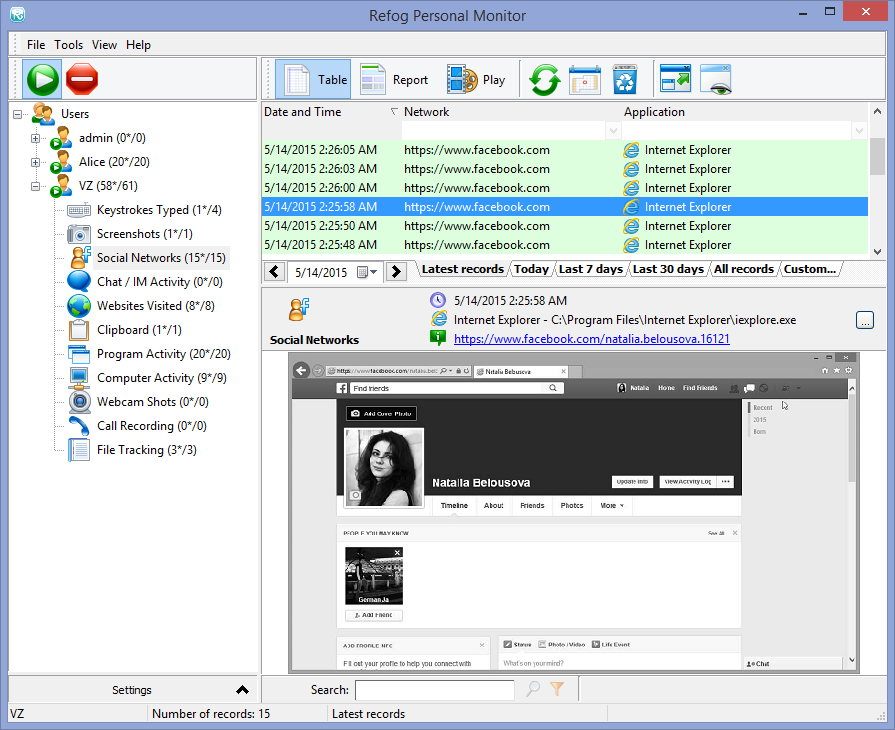
Refog was designed to skip on the bloat and include all the features the family needs. The tool will record every key pressed on your computer, but that’s not all! It will log every Web site visited on your computer, and decode every link being clicked. It will log every app being launched, and record for how long it’s been used.

We live in a social world, and you can rely on Refog Monitor for capturing chats in most popular instant messaging apps and social networks (think Twitter or Facebook). Finally, Refog will make periodic screen shots of your computer’s desktop to better display what’s going on.

Cloud Access

Refog comes with 3-days free access to your personal cloud. All logs collected by Refog will be stored in your cloud account, and you will be able to use any Web browser on any device to sign in and review your computer activities.

Monitoring with a Persistent Notice

Refog runs as a regular app and keeps a visible on-screen notice so everyone using the computer knows monitoring is active. Visible, disclosed monitoring is the recommended default. For younger children on a family-owned PC, an optional discreet mode is available — but only after you have told your household that the computer is monitored.

Frequently Asked Questions About Refog Monitoring Software

What information can Refog Monitoring Software collect from my computer? plus minus

Refog records user activity on a Windows PC, including keystrokes, visited websites, application usage, and clicked links. It also captures periodic screenshots to provide a visual record of user sessions.

All collected data is securely uploaded to the cloud, allowing remote access from any device via a web browser. The software offers comprehensive monitoring while maintaining data privacy.

How does Refog help protect my family online? plus minus

Refog helps parents and guardians monitor digital behavior by logging typed messages, browsing history, and app usage. This allows for early detection of risky activity or inappropriate content.

Alerts can be configured to trigger when specific keywords are typed, enabling quick responses. Screenshots add visual context to the logs, offering better awareness of what’s happening on the screen.

Is Refog easy to install and configure? plus minus

The installation process is simple and guided through a step-by-step wizard. Users can select the monitoring settings, language, and whether the software should run in visible or discreet mode.

Refog is compatible with Windows 8, 10, and 11. Once installed, it begins monitoring based on the selected parameters, requiring minimal setup effort.

Can Refog detect my children’s unauthorized online activity? plus minus

Yes, Refog can track typed messages, visited sites, and opened applications to identify digital activity that may require parental attention. It offers a detailed log of actions taken on the device.

With real-time keyword alerts and visual records, parents can respond quickly to potential issues such as inappropriate communication or attempts to access restricted websites.

Does Refog offer a discreet mode? plus minus

By default Refog runs visibly with an on-screen indicator so the people using a computer you own can see monitoring is active. For younger children, an optional discreet mode reduces on-screen visibility on a device you own, after you have disclosed monitoring within your household.

Access to the software is protected by a custom hotkey, ensuring only authorized users can open or manage it.

What makes Refog different from other monitoring tools? plus minus

Refog focuses on essential features such as keystroke logging, screenshot capture, web tracking, and application monitoring—without unnecessary extras. All data is securely stored in the cloud for remote access.

The software’s visible-by-default operation, real-time alerts, and reliable logging make it a practical choice for families seeking an efficient way to stay informed about digital activity.

Does Refog monitor activity on social media platforms? plus minus

Refog captures messages typed in web-based chat interfaces, including those used on social media platforms like Facebook. It logs these inputs along with timestamps and contextual screenshots.

This feature helps users monitor conversations that may take place on popular websites, offering insight into social interactions and online behavior.

How fast does Refog update activity logs? plus minus

Refog begins recording activity immediately upon detecting user interaction. Depending on your internet connection, collected data is synced to the cloud within a few minutes.

Email alerts for keyword detection are sent in near real-time, helping users stay informed about important events as they happen.

Is using Refog legal on my home computer? plus minus

Yes, Refog can be legally used on computers that you own or have authorization to monitor, including those used by your minor children. It is intended for lawful parental control and supervision.

Use of monitoring software on someone else’s device without their consent may be subject to legal restrictions. It is important to comply with local laws and privacy regulations.

Can Refog monitor multiple PCs within one household? plus minus

Refog can be installed on multiple Windows PCs within the same home, allowing centralized monitoring across devices. Each installation syncs to the same cloud account for unified access.

This is especially useful for households with more than one computer, ensuring consistent visibility into digital activity across the entire environment.

Can Refog detect time spent on gaming platforms? plus minus

Yes, Refog logs which applications are used, including gaming platforms such as Steam or Roblox. It also captures keystrokes and screenshots during gaming sessions.

This allows parents to monitor how much time is spent on games and identify any usage that exceeds set limits or occurs during restricted hours.

Can Refog help monitor screen time and device usage habits? plus minus

Refog provides detailed logs of when the computer is in use, which applications are active, and how long they are used. This helps track screen time and overall device usage patterns.

With visual screenshots and time-based reports, users can gain a clear picture of digital habits, enabling better control and balanced use of technology at home.