 Application Monitoring
Application Monitoring records every program launched on a Windows or Mac computer, with start time, end time, total minutes used, and which app was active in the foreground at each moment. Built into Refog Personal Monitor and Employee Monitor to identify excessive gaming, social media, or unauthorized portable apps. Start a free trial.
Application monitoring answers a question that simple browsing-history logs cannot: what software is actually running on this computer, and for how long? Modern apps install in seconds, run from a USB stick without leaving a footprint, or sit behind a generic taskbar icon — making it nearly impossible to know whether a child is studying, gaming, or chatting with strangers, and whether an employee is working, watching YouTube, or running unauthorized portable tools that bypass IT policy.
Refog solves the visibility problem by logging every executable that starts on the system, capturing the application name, the window title at launch, the user who started it, and the foreground/background state second by second. Together with screen capture and user activity timelines, it turns abstract suspicion into a structured, time-stamped record you can review at a glance.
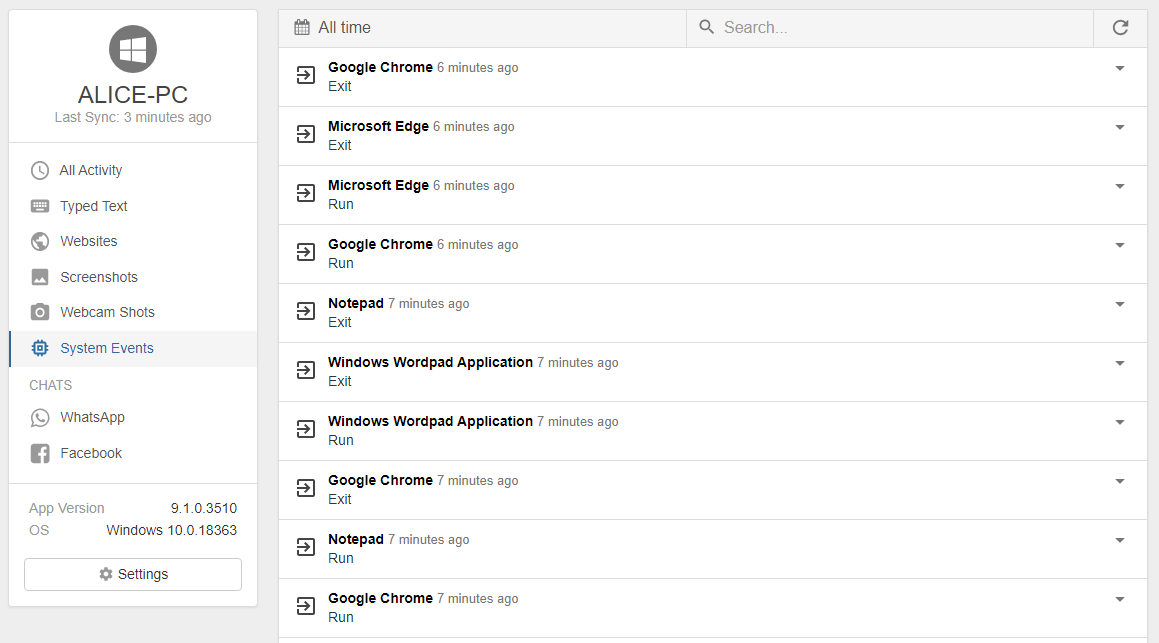
How application monitoring works
Refog hooks into the operating system's process API to detect every new application launch in real time, without slowing down the computer. Each event is written to a local encrypted log with the timestamp, executable path, window title, and the user account that launched it. A separate process tracks the active window every few seconds, so the report can distinguish between an app that is open in the background and an app the user is actually interacting with — the difference between Slack idling in the tray and a two-hour gaming session.
Logs are uploaded to your Refog dashboard on a schedule you choose (by default every few minutes over an encrypted connection). From the dashboard you can filter by user, by date range, or by application category, and export the timeline as CSV for compliance reporting.
Use Refog to:
- Log the start time of every application — including portable apps that run from USB sticks or downloads folder without ever being installed.
- Measure total time spent in each app — separate report rows for each session and a daily roll-up so you see "3 h 47 m in Roblox" at a glance.
- Identify the active foreground app at any second — distinguish real use from background processes that quietly sit in the tray.
- Catch unauthorized software — Tor, BitTorrent clients, anonymous browsers, remote-desktop tools, or unsanctioned cloud-storage apps trigger immediate visibility.
- Detect uninstall/reinstall patterns — apps that appear and disappear repeatedly often signal a child or disclosed employee trying to conceal activity.
- Compare app usage week-over-week per user, so productivity and screen-time trends become a chart, not a guess.
Common use cases
Employer compliance audit. Regulated industries — finance, healthcare, legal — must prove that endpoints run only approved software. Refog gives auditors a complete inventory of every executable launched per workstation, with timestamps and user attribution, so questions like "Was unsanctioned screen-sharing software ever opened on this machine?" take seconds to answer instead of days. Pair this with employee monitoring software for full coverage.
Parents managing excessive gaming. Time-limit apps work only until a child finds a portable Steam launcher or downloads a browser-based game site. Application monitoring exposes the full picture — total minutes in any game across the day, week, or month — so the conversation moves from "stop playing" to specific data both sides can see. Many parents pair it with broader parental monitoring software for context.
IT administrators spotting shadow IT. Employees frequently install productivity tools, AI assistants, or screen-sharing apps without filing a ticket. Each one is a potential data-egress risk. Refog flags every new executable the moment it runs on the network, including portable versions that bypass installer-based asset inventories — closing the gap between IT's official software list and what is actually executing on user machines.
What you'll see in reports
Each application-monitoring report is grouped by user and date, with one row per session showing the application name, window title, start time, end time, and total duration. A summary panel ranks the top ten apps by time used, highlights any new applications launched for the first time today, and flags executables matching a customizable watchlist (gaming, streaming, anonymizers, remote-access tools). You can drill from any row into the matching file tracking record or screenshot taken at the same moment, so an unfamiliar app name becomes a full forensic story in two clicks.
Privacy and legal note
Refog is intended for monitoring computers you own or for which you have a clear, lawful basis to monitor — your own family devices, or company-owned endpoints with a written acceptable-use policy that has been disclosed to employees.
"Transparent monitoring with a posted policy is consistently more effective than covert monitoring, because it changes behavior at the source rather than after the fact." — Refog deployment guide for HR and IT teams
Always check local laws before deploying monitoring software, especially in regulated industries or jurisdictions with strict employee-consent rules.

