
ChatGPT Parental Controls: How to Set Them Up — and Is ChatGPT Safe for Teens?
How to set up ChatGPT parental controls step by step, what each setting does, what parents still can't see — and an honest answer to whether ChatGPT is safe for teens.

How ChatGPT protects teens now: two layers

ChatGPT now protects teenagers in two separate layers, and most confusion about "ChatGPT parental controls" comes from mixing them up. The first layer switches on by itself: since August 18, 2026, OpenAI places anyone its system estimates is under 18 — or who states an age between 13 and 17 — into a stricter experience called ChatGPT for Teens, on Free and paid personal plans. It builds on the age prediction OpenAI began rolling out in January 2026. The second layer is the parental controls themselves, and they exist only once you link your own ChatGPT account to your teen's.
The automatic layer does more than many parents assume. According to OpenAI's description of its age-prediction system, it reduces graphic violence, viral challenges, sexual, romantic or violent role-play, depictions of self-harm, and content that promotes extreme beauty standards or unhealthy dieting. The teen version is also designed not to use romantic language or encourage emotional dependence. It adds Study Mode, reminders that encourage breaks, and homework reminders that steer a teen who seems to be shortcutting an assignment back toward Study Mode. CNN reported that the break nudges come after 90 minutes of activity within a three-hour window; OpenAI's own pages don't give a number.
To decide who gets the teen experience, OpenAI estimates age from signals such as how long an account has existed, the times of day it is usually active, usage patterns over time and the age the user has stated. When it isn't confident, it says it defaults to the safer experience. An adult who is misclassified can confirm their age through a verification service called Persona — usually a live selfie, in some countries a government ID — under Settings > Account > Verify age. For readers in Europe: on August 25, 2026, OpenAI said age prediction had begun rolling out in the EU, so the automatic layer may not have reached every account there yet.
| Automatic for teen accounts | Only after you link accounts | |
|---|---|---|
| Content | Built-in safeguards on graphic, sexual, romantic and self-harm content | Linking adds a Reduce sensitive content safeguard, on by default; only you can turn it off, and that leaves the other teen protections in place |
| Time | Reminders that encourage breaks | Quiet hours: set times when ChatGPT can't be used at all |
| Homework | Study Mode and homework reminders; your teen can also schedule their own Study hours | You can make new chats start in Study Mode, always or on a schedule |
| Features | Memory, voice and image tools stay on | Switch off saved memories, Voice Mode, image generation and model training |
| Alerts | Nothing reaches you | Safety notifications in a few serious situations |
That split is the most useful thing to understand before you touch a setting. If you do nothing, your teen still gets the automatic layer — provided ChatGPT correctly identifies them as a teen. Linking adds the controls, and it is the only way you will ever hear from OpenAI if something serious comes up.
How to set up ChatGPT parental controls, step by step
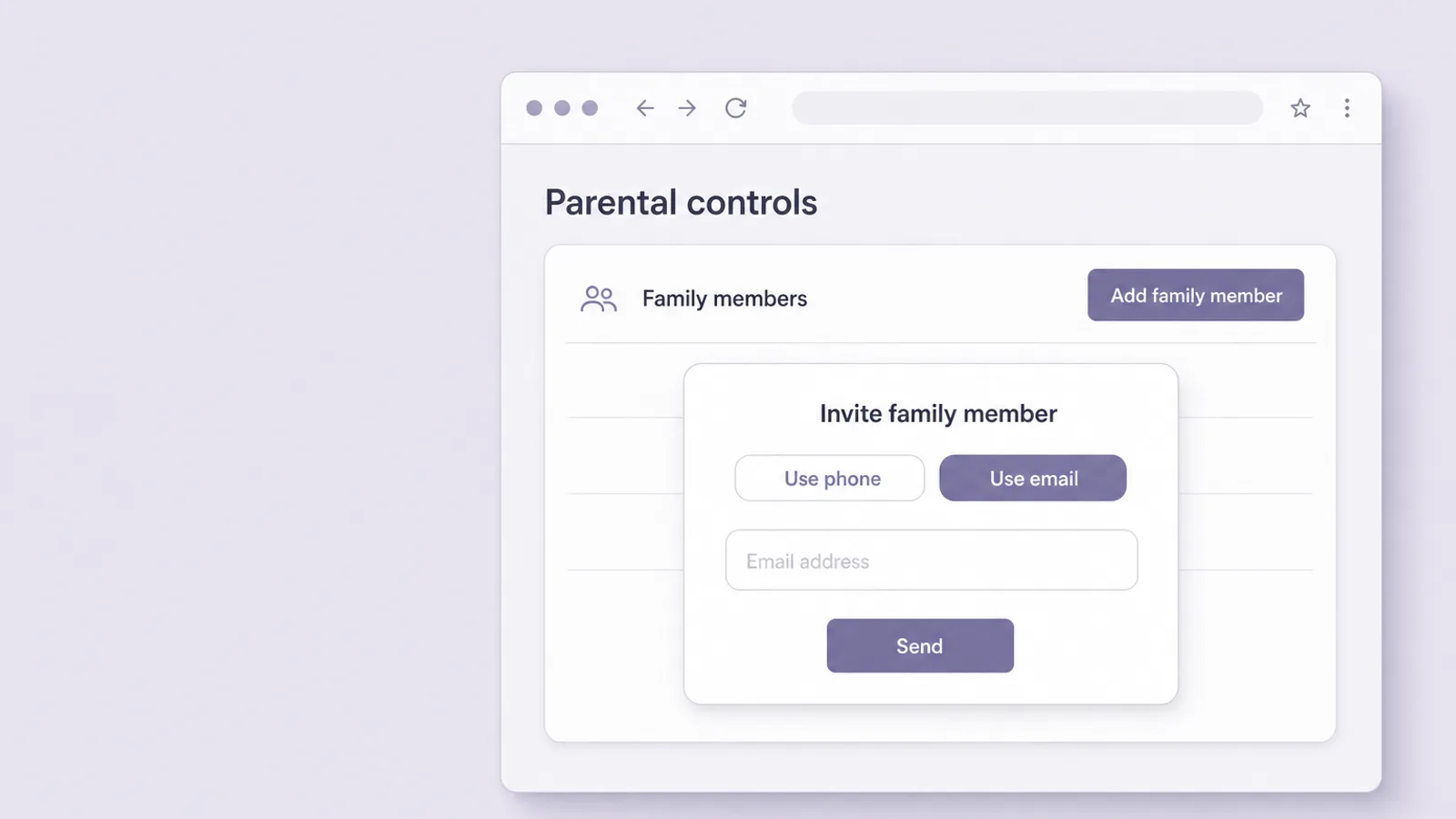
To set up ChatGPT parental controls, you send your teen an invitation from your own ChatGPT account, they accept it, and you then adjust their settings from your account. It takes about ten minutes, and it goes best with your teen sitting next to you: they have to accept the link anyway, and once linked they can see which settings are on.
Before you start
- You need your own ChatGPT account. The controls live in the parent's account. OpenAI launched parental controls for all ChatGPT users and doesn't say a paid plan is required.
- Your teen needs their own account, with their real birthday. The age a user states is one of the signals ChatGPT uses to place them in the teen experience, so check it while you're together.
- Use a web browser if you can. OpenAI's help center documents the steps for chatgpt.com. Third-party guides describe the same Settings > Parental controls path in the mobile apps, but if a menu looks different on your phone, the browser is the reliable route.
Link your accounts
- On chatgpt.com, open Settings from your profile menu and select Parental controls.
- Select Add family member. Under Invite family member, choose Use phone or Use email, enter your teen's number or address, and select Send.
- Your teen receives a text or email with a link to connect their ChatGPT account, and accepts it. Their name then appears under Family members on your Parental controls page.
- Select your teen's name under Family members to open their settings, and work through the controls in the next section.
Your teen can also start the process from their side: Settings > Parental controls > Invite a parent, then the same phone-or-email choice. One parent or guardian can link to several teens, but each teen can be linked to only one parent or guardian at a time — so in a two-parent household, decide together whose account holds the controls.
Every ChatGPT parental control, and what we'd choose
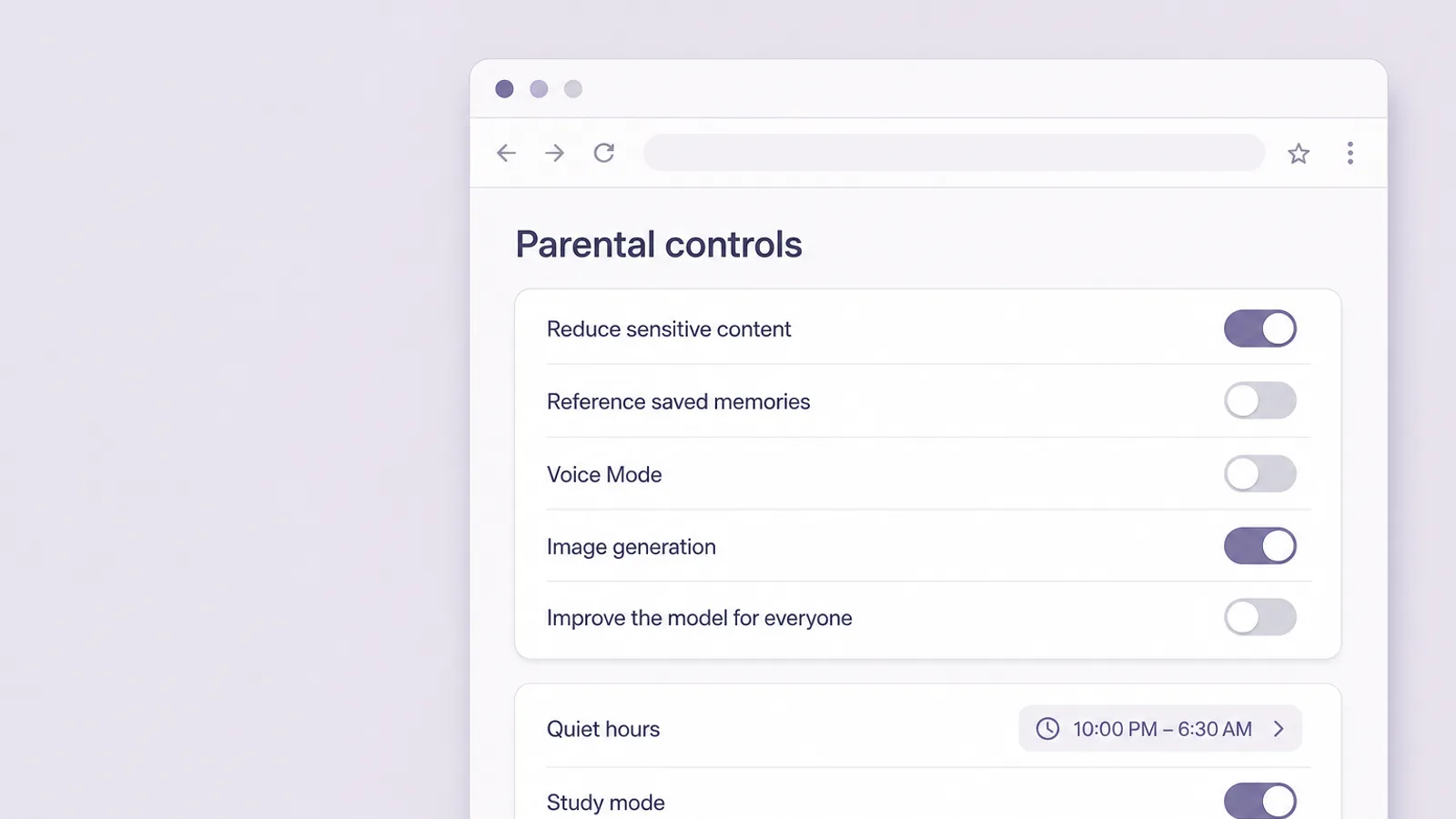
ChatGPT's parental controls are ten switches and schedules on your teen's settings page, plus safety notifications, which switch on automatically once you link. Linking by itself switches on the sensitive-content safeguard. Six features stay on by default — saved memories, Voice Mode, image generation, model training, Codex network access and Cloud browser — and the three study and quiet-time controls start off. The real choices happen when you go through them. Here is each one, with OpenAI's default from its help center and a suggested starting point to adjust to your teen — not a rulebook.
| What it does | Default | Suggested | |
|---|---|---|---|
| Reduce sensitive content | Adds safeguards against graphic content, viral challenges, sexual, romantic or violent role-play and extreme beauty ideals | On | Keep on at every age |
| Quiet hours | Times your teen can't use ChatGPT at all, including ChatGPT Work, OpenAI's agent for longer, multi-step tasks | Off | On for school nights; you can add more than one block |
| Study mode | New chats in the main ChatGPT experience start in Study Mode, which guides rather than hands over answers; not GPTs or Projects | Off | On for 13–14 if homework shortcuts worry you |
| Study hours | A schedule when new chats start in Study Mode; doesn't block access or apply to GPTs and Projects | Off | Weekday homework hours, if Study mode is off |
| Reference saved memories | Lets ChatGPT personalize replies using what it has remembered | On where available | Off for 13–14; revisit at 15+ |
| Voice Mode | Spoken, back-and-forth conversation | On | Off for 13–14; on later by agreement |
| Image generation | Creating and editing images | On | On after a talk about real people's photos |
| Improve the model for everyone | Whether your teen's chats can be used to help improve OpenAI's models | On | Off at every age |
| Codex network access | Lets code run by ChatGPT Work connect to online services | On | Off unless your teen actually uses ChatGPT Work |
| Cloud browser | Lets ChatGPT Work visit public websites with its built-in browser | On | Off unless your teen actually uses ChatGPT Work |
Turn off model training, whatever your teen's age
"Improve the model for everyone" is on by default, which means your teen's conversations can be used to help improve OpenAI's models. Turning it off doesn't disable anything else on the list. The American Academy of Pediatrics advises clinicians to "encourage families to set privacy defaults to the most protective option," and this is the clearest example on the page.
Give memory and voice a younger-teen default
Memory lets ChatGPT carry details from one conversation into the next; Voice Mode turns it into something your teen talks to out loud. Both are genuinely useful, and both make a chatbot feel more like a companion than a tool. California's new companion-chatbot law, SB 1119, signed on September 10, 2026, will make persistent memory off the default for children on the apps it covers from July 1, 2027, with a narrow exception for 16- and 17-year-olds where an operator builds specific guardrails. Whether it reaches a general-purpose assistant like ChatGPT is untested, but it is a clear signal of where lawmakers see the risk. For a 13- or 14-year-old, starting with both off and revisiting in six months is a reasonable middle path.
Set quiet hours first
Quiet hours is the setting most worth your time. Select your teen under Family members, choose Quiet hours, and set a start and end time — you can add more than one block, say school nights plus a Sunday-evening wind-down. It blocks ChatGPT entirely during those hours, unlike Study hours, which only changes how new chats start. Neither study setting reaches custom GPTs or Projects, where your teen can still get straight answers.
Talk about images before you decide
Image tools are mostly creative fun, and the teen version shows a reminder before some image uploads to check for sensitive information. The conversation worth having first is about real people: editing or generating pictures of classmates, even as a joke, can go badly wrong — our guide to deepfakes and teens explains why that line matters.
What ChatGPT parental controls can't do

ChatGPT parental controls can't show you your teen's conversations — not as they happen, and not afterward. OpenAI's help center is explicit about it:
Linking accounts does not give a parent or guardian access to a teen's conversations, chat history, or real-time activity.
— OpenAI Help Center, "Managing parental controls in ChatGPT"
That is a deliberate design choice, and a defensible one: a tool teens know reports everything is a tool teens stop using honestly. But it means the controls tell you what your teen can do in ChatGPT, not what they are doing. The limits worth knowing:
- Alerts cover a narrow set of serious situations. You're notified when trained reviewers identify a serious self-harm concern or behavior that may be associated with disordered eating, or when your teen's account is deactivated over violence. Disordered-eating alerts cover regular chats only, not ChatGPT Work or Codex. Everything else produces no alert.
- They work only while linked. Your teen can unlink at any time. You'll be notified if they do, and from that moment you can't manage settings or receive alerts.
- They belong to one account. The controls don't follow your teen to a second account, a friend's account, or other AI apps such as Gemini, Snapchat's My AI or Character.AI. OpenAI's pages don't say how teen protections apply when someone uses ChatGPT without logging in.
- The automatic layer depends on the age signal. A teen whose account carries an adult birthday may not be placed in ChatGPT for Teens, which is why checking the birthday belongs in your setup, alongside linking.
- Emergency escalation is still a work in progress. OpenAI says it is still working on when and how to reach law enforcement or emergency services if it detects an imminent threat to life and can't reach a parent. An alert is not an emergency service.
Guardrails help, but they're not foolproof and can be bypassed if someone is intentionally trying to get around them.
— OpenAI, "Introducing parental controls"
Read together, the limits point one way: the controls are a seatbelt, not a window. They lower the odds of the worst content and tell you about the rarest, most serious moments. They won't tell you that your teen has started using ChatGPT as a confidant after hard days — only your relationship will.
If you get a ChatGPT safety notification

If you get a ChatGPT safety notification, treat it as a reason to check in with your teen in person, soon — not as a verdict. Notifications are deliberately thin: a brief description of the type of concern, information about an account deactivation if there was one, and support resources. They never include the conversation itself, so you'll start the conversation knowing very little.
A worked example
Say it's 11:40 on a school night, and a text arrives: ChatGPT's reviewers have identified a possible serious self-harm concern on your 15-year-old's account. You don't know what was said, and you won't find out from OpenAI. Here is what the next ten minutes can look like:
- Go to them now, not in the morning. Knock, sit down, keep your voice low. You're there because you care, not because they're in trouble.
- Say what happened, plainly. "I got an alert from ChatGPT tonight. It didn't tell me what you wrote — just that something worried them. I'm not angry. I want to know how you're doing."
- Ask the direct question if it's on your mind. "Have you been having thoughts of hurting yourself, or of not wanting to be alive?" Asking plainly is kinder than hinting, and it gives them permission to answer honestly.
- Make home safer tonight. Quietly lock up or remove medications and any firearms. Helping keep someone safe, including by reducing access to lethal means, is one of the steps the 988 Lifeline recommends.
- Bring in help. If anyone is in immediate danger, call 911. If your teen is struggling but safe, call or text 988 together — the 988 Suicide & Crisis Lifeline is free, confidential and open 24/7 — and book an urgent appointment with their doctor.
- Don't lead with the phone. Confiscating the device or unlinking in anger teaches a teen that being flagged means being punished — and that the next hard conversation should happen somewhere you won't hear about.
An alert about possible disordered eating calls for the same private, unhurried check-in — plus a call to your teen's doctor, who can assess it properly. An alert about a violence-related account deactivation calls for the same calm order: ask what happened before assuming the worst, because OpenAI's brief description is all you'll have to go on.
Is ChatGPT safe for kids and teens?

ChatGPT is reasonably safe for most teens 13 and older as a tool for homework, questions and creative projects — with the teen experience on, your accounts linked and a few ground rules agreed. It is not safe as a substitute for a friend, a therapist or a crisis line, and it isn't allowed for children under 13 at all: OpenAI's terms of use require users to be at least 13, or older where a country sets a higher minimum, and anyone under 18 needs a parent or guardian's permission.
Your teen is very likely already using it. In Pew Research Center's late-2025 survey, 64% of US teens said they use AI chatbots and about three in ten do so every day; ChatGPT, at 59%, was by far the most used. In a follow-up report, 54% said they use chatbots to help with schoolwork — and 12% to get emotional support or advice.
That last group is where the concern sits. In a national survey published in JAMA Pediatrics in June 2026, 19.2% of 12- to 21-year-olds said they had used AI chatbots for mental-health advice, up from 13.1% in the same team's similar survey a year earlier, and most of those who did hadn't told anyone (63.3%). The American Academy of Pediatrics, citing the American Psychological Association, notes that general-purpose chatbots like ChatGPT "were not designed to give clinical feedback."
Independent reviewers remain cautious. Common Sense Media rated ChatGPT "High Risk" for teens in October 2025, and in August 2026 said it would publish a full assessment of ChatGPT for Teens once testing is complete; as of late September 2026, no formal independent safety assessment of the teen version had been published, so any verdict — including this one — leans partly on OpenAI's own description. Robbie Torney, who leads its AI assessments, told Engadget that the new teen version makes important commitments, "but we need evidence to show that those safety commitments and features actually work."
The scrutiny has a legal side too, and it is still unresolved. In August 2025, the parents of 16-year-old Adam Raine sued OpenAI in California, alleging ChatGPT contributed to their son's death; OpenAI denies the allegations. In June 2026, Florida's attorney general sued OpenAI over alleged harms to minors; OpenAI says it has "industry leading protections" for them. None of these allegations has been decided in court.
- Under 13Not allowed. OpenAI's terms set 13 as the minimum. Wait for an account of their own; if a teacher assigns an AI tool, ask what the school itself provides.
- 13 to 14Link accounts and set it up together: sensitive content reduced, model training off, memory and Voice Mode off, quiet hours on school nights, Study mode on if homework shortcuts are a worry. Keep use in shared spaces.
- 15 to 16Keep the link and the content setting; loosen memory, voice and study defaults as trust builds. The focus shifts from settings to what ChatGPT is for — and what it is not.
- 17Plan the hand-off. Controls are removed once ChatGPT identifies the account as 18 or older, with a heads-up about a week before. Use this year to move from settings to judgment.
The conversation that makes the settings work

The settings take ten minutes; the conversation is what makes them hold. Four things are worth saying out loud, and here is roughly how they can sound.
Why you're linking
"I'm not going to be reading your chats — I can't, and I don't want to. What I'll get is a heads-up if ChatGPT's safety reviewers ever think you're in real trouble. That's the part I care about."
What ChatGPT is for — and what it isn't
Teens tend to trust a fluent answer, and the American Psychological Association's advisory on AI and adolescents asks adults to push back on exactly that:
Parents and educators should continually remind adolescents that the content they find online and from AI may not be accurate and may actually be intended to be persuasive and could be harmful.
— American Psychological Association, "Artificial intelligence and adolescent well-being" (June 2025)
"Use it to understand the homework, not to do it for you. And it can sound completely sure of itself while being wrong — so check anything that matters."
The line about feelings
"If you're ever having a really hard time, I'd rather you came to me — or texted 988 — than worked it out with a chatbot. It isn't a person, and it can't be there with you."
The second-account question
"If the settings ever feel too tight, tell me and we'll look at them together. What I'd ask is that you don't set up a second account to get around them." Then keep that promise: revisit the settings every few months and loosen them visibly as your teen shows good judgment. A teen who sees the rules moving with them has much less reason to route around them.
For the wider picture — including why companion apps raise different questions from homework helpers — see our guides to AI risks for teens, AI companion chatbots and whether Character.AI is safe.
Frequently asked questions
Can parents see their teen's ChatGPT conversations?
No. Linking accounts doesn't give you access to your teen's conversations, chat history or real-time activity, and safety notifications don't include what was said. What you get is control over features — quiet hours, memory, Voice Mode, image generation, model training and study settings — plus an alert if trained reviewers identify a serious self-harm concern or signs of disordered eating, or if the account is deactivated over violence. To learn how your teen actually uses ChatGPT, ask them.
How do I set up parental controls on ChatGPT?
On chatgpt.com, open Settings from your profile menu, select Parental controls, then Add family member. Under Invite family member, choose Use phone or Use email, enter your teen's details and select Send. Your teen gets a text or email with a link and must accept it. Then select their name under Family members to adjust the settings. Your teen can also start from their side with Invite a parent. You need your own ChatGPT account.
How old do you have to be to use ChatGPT?
At least 13. OpenAI's terms of use require users to be 13 or the minimum age in their country, and anyone under 18 needs a parent or guardian's permission. Since August 2026, users ChatGPT estimates are under 18, or who state an age from 13 to 17, are automatically placed in ChatGPT for Teens, which has stricter content protections. Children under 13 aren't permitted to have an account at all.
Can my teen turn off ChatGPT parental controls?
Not while the accounts are linked: a teen can't change settings a parent manages. But either of you can unlink the accounts at any time, and if your teen does, you're notified — after which the controls and safety alerts stop. The controls also don't follow your teen to a second account or to other AI apps. That's why the setup works best as an agreement your teen understands, not a lock they're trying to pick.
Will my teen know I've set up parental controls?
Yes. Linking only works if your teen accepts an invitation, and once your accounts are linked they can see which settings are turned on. That transparency is by design, and it's worth leaning into: explain what you've turned on and why, and agree to revisit the settings as they get older. Controls a teen has agreed to are far less likely to prompt a second account or a workaround than rules that simply appear.
What is ChatGPT for Teens?
ChatGPT for Teens is the stricter version of ChatGPT that OpenAI began rolling out on August 18, 2026. Users its system estimates are under 18, or who say they're 13 to 17, are placed in it automatically. It reduces graphic, sexual, romantic and self-harm content, avoids romantic language, and adds Study Mode, homework reminders and break reminders. It doesn't require a parent to link accounts; parental controls add a second, optional layer on top.
Is it safe for my teen to use ChatGPT for mental health advice?
It shouldn't be their main source. The American Academy of Pediatrics, citing the American Psychological Association, notes that general-purpose chatbots weren't designed to give clinical feedback, and Common Sense Media advises that teens shouldn't use AI for mental-health support. A chatbot can't know your teen or step in if they're in danger. If your teen is struggling, involve their doctor. If they may be in immediate danger, call 911 or your local emergency number; in the US, you can also call or text 988.