 File Tracking
File Tracking logs every file operation on the computer — creation, copying, renaming, deletion, and transfers to USB or cloud drives. Captures source path, destination, file size, timestamp, and the user account that performed the action. Works alongside application monitoring and screen capture in Refog Personal Monitor and Employee Monitor. Start free trial.
File tracking answers a question that antivirus and DLP suites often miss: what files actually moved on this computer today, and where did they go? Endpoints handle thousands of file operations a day — downloads, email attachments, chat transfers, USB copies, drag-and-drops between cloud-sync folders. Most are harmless, but a single CSV copied to a personal Dropbox or a single torrented installer is enough to create a serious problem. Refog turns that flow into a searchable timeline.
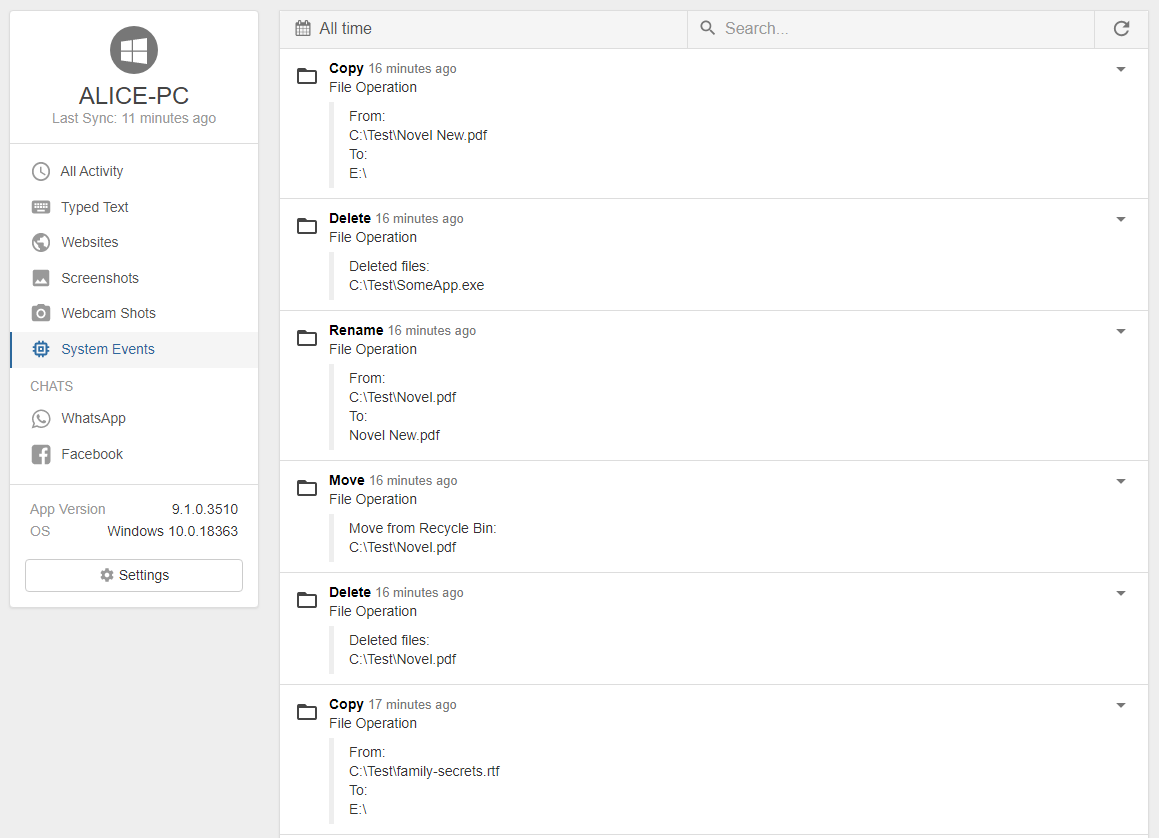
Refog records the full lifecycle of files the user touches: creation, every subsequent rename or copy, the moment a file lands on removable media, and deletion. Each event is tied to the user account, the application that triggered it, and the precise timestamp — so you can reconstruct exactly how a sensitive document moved across the system or how a piece of malware reached the desktop.
How file tracking works
Refog hooks into the operating-system file-system events on Windows and macOS, capturing operations as they happen rather than scanning the disk on a schedule. Every event logged includes the source path, the destination path (for copy and move), the file size, the SHA-style hash for executables, the parent application, and the user. Logs are encrypted locally and uploaded to your Refog dashboard, where you can filter by file extension, by folder, by user, by application, or by removable-media volume label. A separate report flags newly downloaded executables and any file that crosses from a corporate folder into a personal cloud-sync directory or a USB device.
Use Refog to:
- Track copying, renaming, and deletion of files across local, network, and removable drives — with full source-and-destination paths.
- Detect USB and external-drive transfers — see exactly which files were copied to a thumb drive or external SSD, with the volume label and serial number recorded.
- Watch downloads in real time — every file saved by a browser, torrent client, or chat app appears in the report within minutes of arriving on the disk.
- Identify newly created executables — first-seen
.exe,.dmg,.pkg, or script files trigger a separate alert lane so unknown software does not slip in unnoticed. - Reconstruct file history — chain creation, copies, and renames into a single timeline to answer "where did this document come from and where did it go" questions in seconds.
- Filter by extension, folder, or user to focus a review on the specific subset that matters today, instead of scrolling through every disk write.
Common use cases
Employer — preventing intellectual-property exfiltration. The classic departing-employee scenario: someone gives notice, then quietly copies the customer database, design files, or pricing spreadsheets to a USB drive or a personal cloud. Refog file tracking catches this in the act — every USB transfer is logged with the file name, size, and destination volume, and every cloud-sync folder write is timestamped with the originating user. Combine with employee monitoring software to get the broader behavioural context around the file event.
Parent — illegal downloads and malware. Kids on shared family computers download installers, cracked games, and "free" media from sources that are often laced with adware, miners, and outright malware. File tracking surfaces every executable and archive saved to disk, where it came from (the originating browser tab is captured by user activity), and whether it was opened. Parents can intervene before a single bad download takes the household machine offline.
Forensics — incident timeline reconstruction. Whether a security team is investigating a phishing-driven compromise or HR is responding to a confidentiality complaint, the first question is always what files moved when, and who moved them? Refog file logs cover months of activity in a structured, exportable form that turns hours of disk forensics into a CSV review.
What you'll see in reports
Each file-tracking report row shows the operation type (create, copy, move, rename, delete), the source and destination paths, the file size, the timestamp, the user account, and the parent application that triggered the event. Summary panels rank the top folders by write volume, list every removable-media transfer for the day, and flag any executable that has not been seen on this endpoint before. From any row you can jump straight to the matching screenshot or the surrounding session window for full context — turning an isolated file event into a complete forensic story.
Privacy and legal note
Refog is intended for monitoring computers you own or for which you have a clear, lawful basis to monitor — your own family devices, or company-owned endpoints with a written, disclosed acceptable-use policy.
"File-level monitoring is most defensible when the policy is written, signed, and re-confirmed at each device login — covert deployment invites disputes that the data alone cannot win." — Refog deployment guide for HR and IT teams
Always check the laws and regulations in your country, state, and industry before deploying file-monitoring software, especially in regulated sectors with strict employee-consent rules.

