 User Activity
User Activity Tracking logs total system time, login and logout events, active versus idle periods, and application usage per user — revealing screen-time patterns, policy violations such as unauthorized torrenting, and the actual workday shape on company endpoints. Built into Refog Personal Monitor and Employee Monitor. Start a free trial.
User activity tracking answers the deceptively simple question that drives most monitoring decisions: what does this person actually do on this computer in a day? Self-reports are unreliable, time-tracking apps can be paused, and casual observation only catches what is visible in the moment. Refog records the full activity timeline — when each user logged in, when they were truly active versus idle, which applications they used and for how long, what websites they visited, and how the day broke down hour by hour — so screen time, productivity, and policy compliance become facts you can review instead of suspicions you have to argue about.
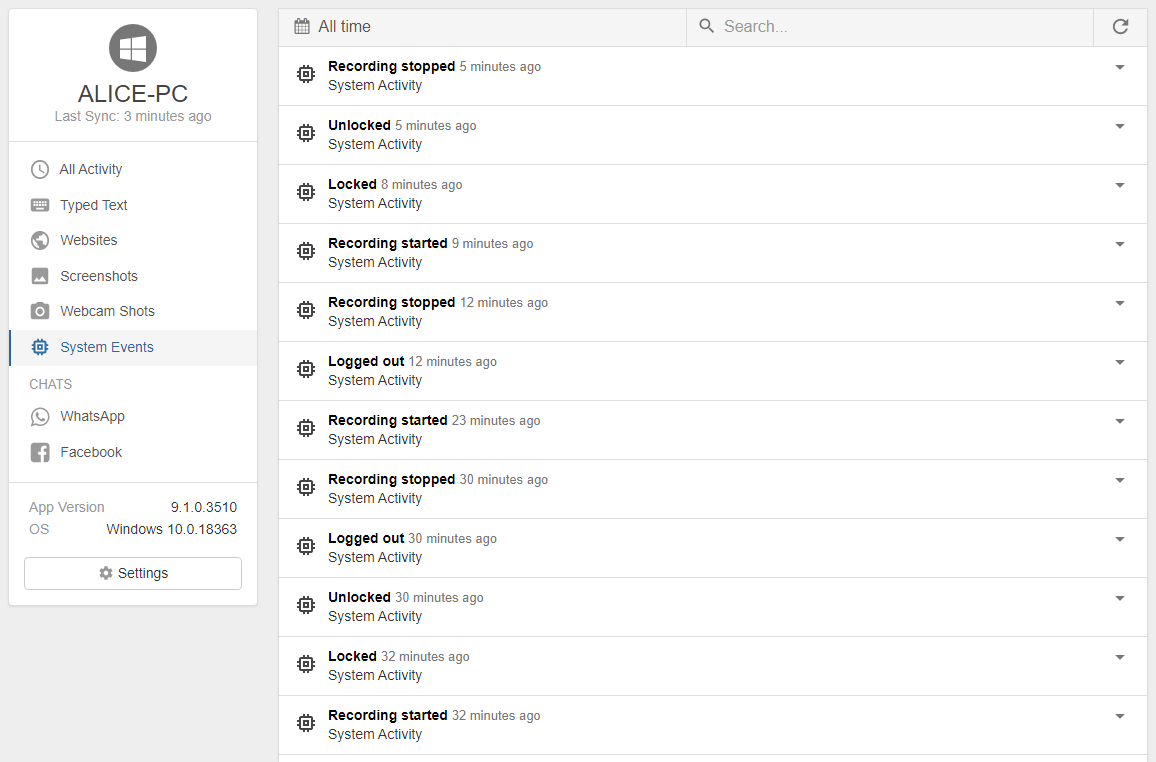
The same record helps in two very different settings: parents who want to teach their children responsible internet use without standing over their shoulders, and managers who need a fair, evidence-based way to evaluate remote-team output. In both cases, having a clear timeline turns the conversation from blame into specifics.
How user activity tracking works
Refog combines several signals into a single per-user timeline. Login and logout events come from the operating-system session manager. Active-versus-idle status is derived from input events — a stretch with no keyboard or mouse activity is marked as idle, even if applications are still open in the background. Application usage is captured through application monitoring, web visits through browser-history capture, and the visual context through screen capture at intervals you control. Together they produce an hour-by-hour visualization of the day, plus daily and weekly roll-ups for trend reviews.
Use Refog to:
- Log total active time per user across the day, week, or month — separated cleanly from idle time so "8 hours logged in" doesn't become "8 hours of work" by accident.
- Capture login and logout events — including remote-desktop and terminal-server sessions, so shift starts and ends are recorded automatically.
- Track time spent in each application — a per-user breakdown of productivity tools, communication apps, browsers, and games.
- See web activity in context — which sites were visited and how long they were the active foreground tab.
- Detect torrenting and bandwidth-intensive activity — peer-to-peer clients and download managers appear in the application timeline regardless of installation method.
- Visualize the daily timeline — an hour-by-hour bar showing active vs idle, working vs leisure, plus a heat map across the week to spot patterns.
Common use cases
HR — supporting performance management. When a manager raises concerns about an employee's productivity, the conversation usually devolves into anecdotes. User activity tracking provides the structured record HR needs to either substantiate a performance-improvement plan with specific data — "average active time was 3 h 15 m per workday" — or to push back when the data does not support the manager's perception. Either outcome is a better one than the anecdote.
Forensic incident review. After a security incident, the question "what was this user doing on the day in question?" matters as much as the technical artifacts. Refog provides a minute-by-minute reconstruction of which applications were active, which sites were visited, and which files were touched, sourced from file tracking. The combined timeline is what turns a fragmented incident into a defensible narrative for the report.
Manager — daily summary for distributed teams. Remote and hybrid managers struggle with proxy signals — Slack response time, lines of code, calendar density — that don't actually reflect the work. A daily user-activity summary gives a clean answer: who logged in, what they spent time on, where their day got fragmented. Used transparently and discussed openly, it removes the "are they really working?" anxiety that otherwise corrodes remote team trust.
What you'll see in reports
The user-activity dashboard shows a per-user daily timeline with active blocks, idle blocks, and the dominant application color-coded across each block. A summary panel surfaces total active hours, top five applications by time, top ten sites by time on page, and an automatic flag for any application or site matching a configurable watchlist. Login and logout events are pinned to the timeline so shift starts, breaks, and end-of-day are immediately visible. Every row drills down into the matching screenshot or application-monitoring entry for full context — and every report can be exported as CSV for HR, audit, or self-tracking purposes.
Privacy and legal note
Refog is designed for monitoring computers you own or for which you have a clear legal basis to monitor — your own family devices or company-owned endpoints with a written, disclosed acceptable-use policy.
"User-level activity tracking is the most personal form of workplace monitoring — its deployment should always be paired with transparent disclosure, a clear business purpose, and proportional retention limits." — Refog deployment guide for HR and IT teams
Always check the laws and regulations in your country, state, and industry before deploying user-activity monitoring, especially in jurisdictions with strict employee-consent rules.

